


Home Office Upgrades 2025: How to Build a Smarter, Calmer, More Productive Workspace
Your home office isn’t just a desk and a chair anymore—it’s mission control for your career. In 2025, hybrid schedules, video-heavy collaboration, and AI-driven workflows reward people who can work deeply, securely, and comfortably from anywhere. The fastest way to get there? Upgrade the environment that powers your work.
A high-performing home office does three things exceptionally well: it supports your body (ergonomics and comfort), it reduces friction (organization, tools, and routines), and it protects your focus (security, privacy, and aesthetics). Nail those, and your attention stops leaking. You start and end your day with more energy—and more done.
This guide translates those principles into practical steps and smart product picks you can deploy in a weekend. You’ll clarify your layout, label what matters, speed through routine tasks, optimize temperature, protect privacy, and refresh the look of your space for a clean, motivating backdrop. Think of this as your blueprint for a workspace you look forward to using every day.
Let’s build it, step by step.
Step 1: Audit Your Workspace (15-Minute Baseline)
Before buying anything, map what’s working and what’s not. Use this quick pass-through to reveal your biggest gains.
- Ergonomics: Is your monitor at or slightly below eye level? Are your elbows near 90 degrees while typing? Feet flat or supported?
- Lighting: Do you have bright, indirect light for daytime and warm task lighting for evenings? Any glare on the screen?
- Acoustics: Can household noise bleed into calls? Do you have soft surfaces (rug, curtains) to tame echo?
- Cable management: Are wires routed, labeled, and off the floor? Can you unplug a device without guessing?
- Climate: Are you often cold or warm? Does temperature shift midday? Is your heating or cooling solution local and controllable?
- Organization: Is everything you use daily within arm’s reach? Can you find archived items in under 60 seconds?
- Security: Is your camera covered when not in use? Are you confident your space is private?
- Aesthetics: Is your backdrop camera-ready? Do small details motivate you, or distract you?
Mark three problems that cost you time or comfort. Those will guide your upgrade priorities.
Step 2: Lock in Ergonomic Foundations
Your body is the engine of your work. A few precise adjustments can prevent fatigue and boost deep focus.
- Chair and desk height: Set your seat so knees are level with hips. Adjust desk or chair so elbows rest near 90 degrees while typing. If your feet dangle, use a footrest.
- Monitor placement: The top of the screen should sit at or slightly below eye level, about an arm’s length away. Tilt the screen so your neck stays neutral.
- Keyboard and mouse: Keep them close and level with your elbows. Consider a wrist rest if you notice strain.
- Movement: Shift posture every 30–60 minutes. Alternate sitting and standing. Do eye breaks—20 seconds looking at something 20 feet away every 20 minutes.
- Lighting: Use frontal or side lighting for video calls, and avoid bright backlighting that silhouettes you. Warm light (2700–3500K) after sunset helps with wind-down.
Pitfalls to avoid:
- Buying a premium chair but keeping a too-low monitor. Neck strain will undercut the chair’s benefits.
- Over-indexing on standing. It’s the change of posture, not standing all day, that matters.
- Ignoring glare. A small shift of monitor or blind angle can eliminate squinting and headaches.
Step 3: Upgrade Organization for Zero-Guesswork Retrieval
A tidy desk isn’t just aesthetic. It’s the scaffolding for faster decisions and lower stress. 2025’s best approach blends digital clarity with physical labeling so you (and future you) can find anything instantly.
- Create zones: Focus zone (computer, notebook), tools zone (pens, stapler, cables), reference zone (files, books), archive zone (storage).
- Name everything: Label bins, cable ends, power bricks, shelves, and file folders using a consistent format. Think “Client—Project—Year” or “Device—Cable Type—Length.”
- Institute a one-touch rule: When you pick up an item, move it directly to its final home instead of setting it down “for now.”
Recommended Product: NIIMBOT D110 Bluetooth Mini Label Maker — Wireless Organizer for Home, School & Office

The 2025 NIIMBOT D110 delivers sharp 203 DPI thermal printing in a compact, ink-free design that connects easily via Bluetooth. It supports batch printing and various label types, making it perfect for organizing kitchens, school supplies, office files, cables, and more.
$15.99 on Amazon
View on AmazonPrice and availability are accurate as of 01/06/2026 10:58 pm GMT and are subject to change.
Labeling is the unsung hero of productivity. Cables, storage bins, and “mystery” adapters stop being time sinks when they’re tagged clearly.
Step 4: Speed Through Numbers With a Dedicated Printing Calculator
You probably live in spreadsheets—and you should. But for quick totals, reconciliations, and margin checks, a physical 10-key calculator with a printout can be surprisingly faster and more reliable.
- Why it matters: Key-by-feel entry reduces context switching. A printed audit trail lets you verify numbers without re-keying. Great for invoices, expenses, taxes, or cost/sell/margin work.
- Best practice: Keep a small basket with spare paper rolls and a pen. Tear off the tape and attach it to the corresponding document or scan for records.
Recommended Product: CATIGA 2025 Printing Calculator — 10‑Key Desktop Adding Machine with Paper Roll

Designed for accounting-style entry, this upgraded adding machine includes helpful examples and features an easy-load paper system, ergonomic keys, a clear 4-inch display, and a dual-color printer. Use it at your desk or on the go with AC or battery power.
$42.99 on Amazon
View on AmazonPrice and availability are accurate as of 01/06/2026 11:01 pm GMT and are subject to change.
If numbers are part of your day, a dedicated calculator keeps you in flow while your main screen stays on the work itself.
Step 5: Get Climate Control Right (and Your Focus Will Follow)
Thermal comfort is a quiet productivity multiplier. When your body is slightly cold or hot, cognitive performance drops and stress rises. Zone heating in a home office solves that without reheating the whole house.
- PTC ceramic heaters: They warm up fast and self-regulate heat output as they approach set temperature.
- Strategy: Use a personal heater with a timer and thermostat so your office is warm when you sit down—and stays steady during calls.
- Safety basics: Maintain clearance around heaters, place on stable surfaces, and never cover vents. Avoid unattended use.
Choose heater type by room:
- Larger or open rooms benefit from a tall oscillating tower that distributes heat broadly.
- Smaller, enclosed offices feel comfortable with a compact unit focused on your immediate zone.
Recommended Product: ZAFRO 1500W PTC Space Heater — Fast Heat with Digital Display, Remote & 24H Timer

Using an advanced AI chip, this detector quickly finds hidden cameras and RF transmitters across a broad frequency range. It offers visual, vibration, and mixed modes, plus portable, rechargeable convenience for scanning any space. Backed by lifetime support and a money-back guarantee.
$59.99 on Amazon
View on AmazonPrice and availability are accurate as of 01/06/2026 11:03 pm GMT and are subject to change.
Tip: Time your heater to start 10–15 minutes before you log in. You’ll sit down already comfortable, which reduces the “warm-up” lag many people feel each morning.
Step 6: Add Micro-Comforts That Pay Dividends All Day
Micro-comforts are small tweaks that compound into better focus. The right accessory cuts interruptions, shrinks context switching, or just makes work feel better.
A classic example is a good mug warmer. It turns the constant reheat dance into a non-issue, especially during long calls or deep work blocks.
Recommended Product: 60W Coffee Mug Warmer & 14oz Mug — Gravity Induction, 4 Temp Settings with Auto On/Off (2025 Upgrade)
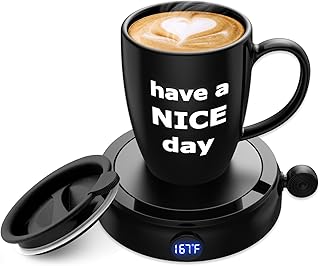
Enjoy faster heating with this 60W mug warmer, complete with a 14 oz mug and four adjustable temperature settings. The gravity-sensing auto on/off and 4-hour shutoff provide safe, worry-free use. Compatible with many mug materials and even candles, it’s a great gift backed by a 12-month service guarantee.
$15.99 on Amazon
View on AmazonPrice and availability are accurate as of 01/06/2026 11:04 pm GMT and are subject to change.
Other micro-comfort wins:
- A soft desk mat to reduce hard-surface fatigue and add traction.
- A simple footrest if your feet don’t rest flat.
- A small plant to improve visual variety and micro-rests for your eyes.
Step 7: Protect Privacy and Peace of Mind
Your home is a workplace—and sometimes a boardroom. You share confidential materials and sensitive calls. While most people will never need professional counter-surveillance, a simple sweep tool can flag questionable signals or lens reflections in your space.
Use cases:
- You host clients or contractors in your home.
- You work with intellectual property or privileged information.
- You need peace of mind before high-stakes calls.
Ethics and law matter. Use any detection tool responsibly. It’s for safeguarding your space, not for snooping on others or interfering with lawful devices.
Recommended Product: 2025 Upgraded Professional RF & Hidden Camera Detector — Portable Anti-Spy Sweeper

ZAFRO’s compact 1500W heater provides quick, quiet warmth and a wider heating range than traditional models. Control it via LED panel or remote, with adjustable temps, a 24h timer, and multiple modes. Built with ETL-certified safety features and a lightweight, portable design, it’s ideal for bedrooms, offices, and small spaces.
$26.98 on Amazon
View on AmazonPrice and availability are accurate as of 01/06/2026 11:05 pm GMT and are subject to change.
Bonus privacy idea: Use a sliding webcam cover when not on calls. It’s a tiny upgrade that removes worry.
Step 8: Refresh Your Visuals for Energy and On-Camera Presence
When your environment looks cared for, you feel it. A simple seasonal refresh can make your office more welcoming to you—and to anyone on the other end of a video call.
Window clings do double duty: they decorate your view, add subtle privacy, and can help prevent bird strikes on large panes of glass.
Recommended Product: Pasimy 8-Pack 2025 Winter Bird Window Clings — Reusable Christmas Window Stickers

Add a vibrant winter touch to your windows with these nature-inspired cardinal bird clings, designed in rich colors that suit both modern and classic décor. Perfect for homes, kids’ rooms, and storefronts, they apply easily to any glass surface and also make a charming seasonal gift. Each set includes 8 multicolor UV-printed sheets.
$0.00 on Amazon
View on AmazonPrice and availability are accurate as of 01/06/2026 11:06 pm GMT and are subject to change.
Other fast aesthetic lifts:
- Declutter your camera background; remove busy patterns.
- Add a neutral backdrop and a plant or framed print.
- Use warm, indirect lighting behind your monitor to reduce eye strain.
Step 9: Streamline Cables, Power, and Backups
Cable chaos chips away at focus. Tackle it once, then future-proof it.
- Map power: Put your surge protector where you can reach it. Label each plug (monitor, dock, lamp) so you can unplug safely without trial and error.
- Route cables: Use adhesive clips or under-desk channels. Keep cords off the floor to avoid snags and vacuum tangles.
- Label ends: Tag both ends of key cables—HDMI, USB-C, power bricks—so swaps are instant. This pairs perfectly with a mini label maker.
- Backups: Set a daily cloud backup and a weekly local backup (external drive). Test restores quarterly so you’re never guessing during a crisis.
Pitfall to avoid: Coiling power cords too tightly can cause heat buildup. Use gentle loops and velcro ties.
Step 10: Light and Sound—Your Hidden Productivity Levers
Lighting and acoustics dictate how you feel during long sessions more than most people realize.
Lighting:
- Daylight: Position your desk perpendicular to windows to minimize glare.
- Task light: Add a dimmable, high-CRI desk lamp for accurate color and eye comfort.
- Evenings: Warm light helps you wind down. Avoid bright, cool light late at night.
Sound:
- Soft surfaces: Rugs, curtains, and bookcases reduce echo and make you sound better on calls.
- Noise management: Consider a white noise app or gentle fan if household noise interrupts focus.
- Mic technique: Keep your microphone 6–10 inches from your mouth, slightly off-center, to reduce plosives and room noise.
A 48-Hour Upgrade Sprint
If you want momentum, here’s a simple weekend plan.
Day 1 (Environment and Comfort)
- Morning: Ergonomics. Adjust chair, desk, monitor. Add a footrest if needed.
- Midday: Lighting. Reposition lamp, reduce glare, and pick a warm evening setting.
- Afternoon: Climate. Set up your heater of choice, program a timer, and test noise levels on a call.
- Evening: Micro-comfort. Deploy the mug warmer and finalize cable routing.
Day 2 (Organization and Privacy)
- Morning: Zone your space. Create labeled bins and assign homes for tools and cables.
- Midday: Label session. Use your label maker on shelves, power bricks, and file folders.
- Afternoon: Numbers workflow. Set up the printing calculator station with spare paper and a pen.
- Evening: Privacy and visuals. Sweep with your RF detector, install window clings, and tidy your on-camera background.
By Monday, your workspace will feel notably calmer—and you’ll save time every day.
Maintenance: Keep Your Office High-Performing
- Weekly reset (10 minutes): Clear surfaces, re-home out-of-place items, wipe screens, empty trash.
- Monthly check (15 minutes): Review labels after any new gear, shred/archive paperwork, test backups.
- Seasonal refresh (30–45 minutes): Tweak the layout for sun angle and temperature changes; swap decor for a fresh backdrop.
Pro Tips to Avoid Common Pitfalls
- Don’t overbuy storage. Add containers only after you define what lives in them.
- Avoid “junk drawers.” Create a labeled “inbox tray” for items you’ll process by day’s end.
- Respect power limits. Heaters and printers may trip circuits if they share outlets with PCs or UPS units.
- Pause before adding tools. Ask: Will this cut a daily friction by at least 30 seconds? If yes, it likely pays back.
FAQ
Q: Are space heaters safe to use in a small home office?
A: Used correctly, yes. Place on a stable, hard surface with clear airflow, keep at least several feet from combustible materials, and avoid unattended use. Don’t share a circuit with other high-watt devices if you can help it.
Q: Do I really need a label maker if I’m mostly digital?
A: If you manage cables, adapters, storage bins, or paper files, a label maker pays off quickly. Physical labels eliminate guesswork and speed up maintenance, especially when you add or swap equipment.
Q: Why use a printing calculator when I have spreadsheets?
A: For routine totals and margin/tax calculations, a dedicated 10-key with a printout is faster and provides an instant audit trail. It complements—rather than replaces—your spreadsheet work.
Q: How do I use an RF detector responsibly at home?
A: Use it to sweep your own space and identify unexpected signals or lenses. Expect learning time to interpret readings. Always follow local laws and respect privacy; it’s a tool for peace of mind, not for monitoring others.
Q: Will a mug warmer affect the taste of my coffee or tea?
A: It won’t brew, but it maintains temperature. For best taste, use the lower settings and a flat-bottom mug. Clean the mug warmer surface regularly and avoid spills for consistent performance.
Conclusion
A top-tier home office in 2025 isn’t about excess—it’s about thoughtful upgrades that protect your focus and energy. Start with ergonomics and lighting. Add zero-friction organization with clear labels and a calculator that speeds small-but-frequent tasks. Stabilize your climate with a right-sized heater. Layer in micro-comforts, privacy checks, and a visual refresh that makes you want to sit down and do your best work.
You don’t need months or a massive budget to feel the difference. Pick two changes from this guide, implement them this week, and notice how much calmer and more capable your space feels. Then keep iterating. Your office is the engine of your day; tune it, and you’ll go farther with less effort.








Leave a Comment