

What’s in this Article
- Quick picks by setup type
- How to choose the right low-height console desk
- How we chose
- Quick Comparison
- FAQ
- Quick answers for console desk buyers
- What we prioritized and how to pick yours
If you play on PS5, Xbox Series X|S, or Switch from a couch or a compact gaming chair, a standard 30-inch office desk is rarely ideal. You want a lower surface that lines up with your TV, keeps consoles ventilated, and hides the coil of controller cables and dock wires that always wander across the living room.
This guide is for console-first players in apartments, bedrooms, or shared living rooms who prefer a TV over a close-up monitor. We focused on low-height desks and TV-stand hybrids under 30 inches, with smart cable routing, controller and headset storage, and surfaces that fit a console, a charging dock, and maybe a soundbar without feeling cramped.
Use this guide three ways. First, skim the quick-pick categories below to match your room and habits. Then jump to the buying checklist to lock in the right height, depth, and cable plan. Finally, apply the setup tips to make wires and docks disappear, even if your outlet is in the worst possible spot.
Before you browse anything, do this first: sit where you actually play and measure your eye height to the floor, plus the distance to your TV. Aim for a desk height that lets the center of your TV or monitor riser sit near eye level without forcing you to crane your neck. For most couch setups that means desk heights in the 22 to 28 inch range, with 24 to 30 inches total surface depth.
What mattered most in our evaluations: true low height under 30 inches, stable construction with minimal wobble, rear cable channels or grommets, space and airflow for full-size consoles, integrated or add-on hooks for headsets and space for controller docks, and an overall footprint that works in tight living rooms or corners. Two realistic caveats to keep in mind: ultra-low 20 to 22 inch units can feel cramped if you rotate into a taller gaming chair, and some corner designs can block a center-channel speaker or soundbar unless you plan placement carefully.
Quick picks by setup type
Small living room, TV-stand vibe
- Look for a low media-bench style with a 22 to 26 inch height, 40 to 55 inch width, and at least 16 to 18 inches of depth for consoles plus a soundbar.
- Open shelves for airflow, a rear cable trough, and a closed cubby for routers or hubs help keep the front clean.
- Add-ons to want: side hook for a headset, a small tray for remotes and charging cables, and a slim surge protector mounted under the top.
Compact desk with a monitor riser for PS5
- A low desk plus a centered riser lets you set a 27 to 32 inch monitor or a small TV at eye level while the PS5 sits upright with 3 inches of side clearance.
- Prioritize a riser depth of 9 to 12 inches and a total desk depth of 23 to 30 inches so the controller dock fits in front without pushing you too far back.
- Vent-friendly shelves keep PS5 temps lower. Avoid enclosed cabinets unless the rear is fully open.
Corner or L-shaped to fight glare
- Corners let you angle the screen away from windows and lamps, and park consoles on a side wing for tidy cabling.
- Seek a lower main surface with one short wing, plus a rear cable channel across the corner seam.
- Make sure both wings clear your baseboards so cables can drop behind without kinking.
RGB-forward look with hidden wires
- Choose matte, not glossy, to prevent LED reflections on the TV.
- Integrated light channels are fine, but demand a cable raceway that runs the whole back edge and a discreet path down a rear leg.
- Keep chargers and docks on a secondary shelf so LED strips stay the visual focus.
Best value with outlets and storage built in
- Look for desks with a rear power shelf or under-mounted power hub so only one visible cord runs to the wall.
- A shallow drawer for gamepads and straps reduces visual clutter in shared spaces.
- Ensure the included power unit has spaced outlets for chunky power bricks and a few USB-A or USB-C ports.
How to choose the right low-height console desk
Nail the height and sightline
- Target a surface height that puts the screen center at or slightly below eye level when you are in your usual posture. For most couches, that means 22 to 28 inches.
- If you use a riser, subtract riser height from your target to avoid a screen that rides too high.
- Edge case: extra-deep recliners can drop your eye line several inches. Re-measure while reclined before committing.
Get enough depth and airflow for consoles
- Minimum surface depth: 16 inches for a basic TV-stand layout, 23 to 30 inches for a desk-plus-monitor setup.
- Leave at least 2 inches of clearance on each side of a console and 3 to 5 inches behind it for exhaust.
- Prefer open backs or large grommets. Avoid sealed cabinets unless you can remove the rear panel.
Plan cable management and charging from day one
- Must-haves: a rear cable channel or raceway, at least one grommet per side, and a leg with an internal pass-through or clips.
- Nice-to-haves: under-desk power shelf, built-in USB ports, and a hidden ledge for a power strip so only one cord hits the wall.
- Mount a headset hook on the left or right, then route its cable to a Velcro tie under the top to stop floor drag.
Demand stability and smart materials
- Look for wide feet, cross-bracing, or a back panel that prevents racking when you pick up a controller.
- Powder-coated metal frames resist scuffs. Laminate or veneer tops with a matte texture cut glare and fingerprints.
- Thick carpet can add wobble. If you are on plush carpet, use furniture cups under the feet.
Fit the room and the people
- Measure wall-to-sofa distance. Leave room for foot traffic behind or in front of the desk if it lives in a shared space.
- If you have kids or pets, choose units with anti-tip hardware or low center-of-gravity designs.
- Soundbar owners should check the internal shelf height before assuming it will fit under a TV or riser.
How we chose
- True low height for TV-first gaming: We only considered desks and TV-stand hybrids that sit roughly 24 to 29 inches high to keep your eyes level with a TV while you are on a couch or low gaming chair. That helps reduce neck strain during long sessions.
- Console fit and airflow: We checked that shelves and cubbies can handle PS5, Xbox Series X|S, and Switch docks without blocking vents. Rear clearance for HDMI and power bricks was a must.
- Real cable management for living rooms: Picks needed rear channels or troughs, grommets or raceways, and a place to mount or hide a power strip. We gave extra credit for controller docks, headset hooks, and tie points that keep charging leads tidy.
- Stability and build: We favored sturdy frames with minimal wobble, smooth edges, and finishes that resist scratches. Wide feet or anti-tip options were prioritized for homes with kids or pets.
- Surface depth and TV support: Tops had to be deep enough for a TV stand base or a center speaker without crowding the front edge. For monitor-first PS5 setups, we looked for risers or shelves that raise a 24 to 32 inch display to a relaxed eye line.
- Footprint and layout flexibility: Small-room picks keep width and depth compact, while corner or L-shaped options help reduce window glare and free up walking space. Reversible shelves or modular layouts scored higher.
- Looks that blend in: Matte, low-gloss finishes that hide fingerprints and cable shadows matter in a living room. RGB is fine if it is subtle and easy to route, not a nest of extra wires.
- Assembly and daily use: Clear instructions, labeled hardware, and included clips or Velcro help you finish clean. We favored designs that let you route a single bundle to the TV and leave the rest hidden.
Trade-offs to know: The lowest desks are best for couch viewing but can limit knee clearance if you switch to a tall chair. Compact stands save space but offer less storage and airflow. Corner layouts tame glare and boost surface area but take more floor space. RGB-heavy picks look bold yet add wiring to manage. Match your choice to your seating height, TV size, distance from screen, and how many consoles and chargers you need to hide.
Quick Comparison
| Product | Best for | Biggest strength | Biggest trade-off |
|---|---|---|---|
| Eureka Ergonomic Small RGB LED Gaming Desk (Black) | Small living rooms and TV-first setups that need a compact desk. | Compact footprint with tasteful RGB for a clean, modern look. | Minimal storage and no hutch for accessories. |
| PayLessHere 47-inch Carbon-Fiber Gaming Desk with Cup Holder and Headset Hook – Blue | Xbox players who want a simple sofa-side station with basics covered. | Built-in cup holder and headset hook keep essentials off the surface. | Limited cable routing compared to premium options. |
| SEDETA 65.7" Gaming Desk with LED Lights, Hutch, Monitor Stand & Storage | Multi-console users who want a riser, hutch, and lots of storage. | Tons of shelving plus a wide monitor stand to keep gear organized. | Takes more floor and vertical space in a living room. |
| Homall 51-inch L-Shaped Gaming Desk with Monitor Riser for Corner Setups (Black) | Corner gaming to reduce screen glare and maximize room layout. | L-shape with a riser creates clear zones for TV, console, and accessories. | Requires a free corner and is harder to reposition. |
| ODK 48" Gaming Desk with LED Lights & Built-In Outlets, Monitor Stand and Storage Shelves | Value shoppers who want LEDs, outlets, and a riser in one desk. | Built-in power reduces brick clutter and shortens cable runs. | Outlet placement is fixed and the surface is narrower than others. |
1. Eureka Ergonomic Small RGB LED Gaming Desk (Black)
Best wide console setup
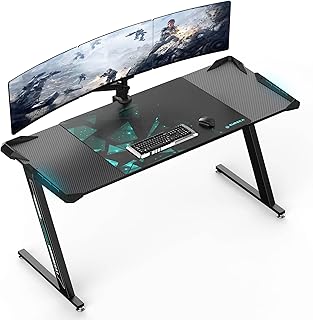
60″ carbon-fiber gaming desk fits two monitors, with a sturdy 500 lb Z-frame, RGB lighting, and a built-in mouse pad. Great for gaming or work – worth a look.
$229.99 on Amazon
View on AmazonWho it is for: console players who want a wide, stable station under a wall-mounted TV or beside a couch, with room for a PS5 or Xbox, a Switch dock, and chargers. If you like an RGB vibe without going overboard, this checks the box.
Why we picked it: the 60 inch surface handles two monitors or a monitor plus your TV, with space left for consoles and controller docks. The 500 lb Z-frame keeps everything planted, so the desk does not wobble when you grab a controller or stand a console upright. RGB lighting gives you a soft bias glow that looks great in dim rooms, and the built-in mouse pad is handy for dashboard browsing or remote play.
Trade-offs: the footprint is big for tight living rooms, and the open frame means cables will show unless you plan them. The RGB strip adds one more plug to your power plan.
Practical tip: mount a small power strip under the back edge with adhesive strips, then run HDMI and power down a leg with Velcro ties for a clean look. Park a charging dock on the back right to corral controllers, and add a stick-on headset hook under the front edge to keep the surface clear. If your TV sits high, add a slim monitor riser for your capture or chat screen so you can keep a relaxed couch posture.
2. PayLessHere 47-inch Carbon-Fiber Gaming Desk with Cup Holder and Headset Hook – Blue
Best budget all-rounder

A do-it-all gaming/work desk: sturdy steel frame, sleek carbon fiber top for precise control, wide surface for dual monitors, and a quick, no-stress setup. Worth a look.
$42.99 on Amazon
View on AmazonWho it is for: console-first players who want a simple, living-room-friendly desk that keeps gear tidy without eating space. The 47-inch width is an easy fit along a wall and gives room for Xbox or PS5, a docked Switch, and a display.
Why we picked it: the combo of a sturdy steel frame, a smooth carbon fiber-style top, and fast assembly makes this a painless upgrade. The cup holder and headset hook do real work in a TV-first setup, keeping cans and controllers off your coffee table and within reach. The surface is wide enough for dual monitors or a single screen with both console and charging dock beside it.
Trade-offs: height is fixed, so measure your seated eye line before you commit. There is no elaborate built-in cable routing, so you will want adhesive clips or a simple under-desk raceway to hide HDMI and power. The blue accents add flair but may stand out in minimalist rooms.
Practical tip: mount a slim power strip under the rear edge, then run one neat bundle down a back leg with Velcro ties. Park your PS5 or Xbox on the right side to shorten controller charge leads, and loop the charging cable over the headset hook so it never slides to the floor.
3. SEDETA 65.7″ Gaming Desk with LED Lights, Hutch, Monitor Stand & Storage
Best storage-heavy setup

Build a clutter-free battle station: spacious desk with dual shelves, hutch, ergonomic monitor riser, and RGB lights that sync to music. See if it fits your setup.
$142.99 on Amazon
View on AmazonIf you want a living-room command center with a place for everything, this storage-first desk nails it. The hutch and dual shelves make room for consoles, docks, remotes, and a charging tray, while the monitor riser gives your screen a defined perch. It suits PS5, Xbox, and Switch players who want a TV-first feel without giving up desk function.
We picked it because it blends a TV stand vibe with actual desk utility. The long surface handles a TV or single monitor and a soundbar. The riser creates a clean bay underneath for controllers or a dock. And the RGB lighting that syncs to music adds a simple, cinematic glow that feels right for evening sessions.
Trade-offs: the size is real, and the hutch can clash with very large TVs. If you prefer a minimalist, ultra-low TV stand look, this will feel busier. Cable runs still need a plan since there are no dedicated grommets, so expect to add clips or a raceway to keep the front clean.
Tip: measure seat-to-eye height and aim to center your screen close to eye level using the riser. Park consoles on a side shelf for airflow. Mount a power strip behind the hutch, then route short USB-C and HDMI leads under the riser. Add a small adhesive hook under the shelf for your headset so the cups never touch the desktop.
4. Homall 51-inch L-Shaped Gaming Desk with Monitor Riser for Corner Setups (Black)
Best corner glare control
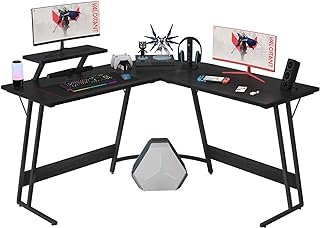
Max your corner space with this L-shaped desk: dual 51” surfaces, carbon‑fiber finish, and a movable monitor stand. Sleek, stable, and built for gaming.
$59.99 on Amazon
View on AmazonIf your TV or gaming display lives in a corner, this L-shaped layout is a win. The dual 51-inch surfaces let you dedicate one side to your console stack and charging dock, and the other to your display or speakers. The movable monitor riser helps get your screen closer to eye level from a couch or compact gaming chair, which reduces neck strain in long sessions.
We picked it because the corner fit solves two living-room problems at once: glare and cable mess. Tuck the desk into a corner, run power along the inside edges, and most wires disappear. The carbon-fiber finish shrugs off fingerprints and is easy to clean, so it stays presentable in shared spaces.
The trade-offs are size and layout. It takes more floor space than a straight desk. The riser also eats into depth on one wing, so oversized soundbars or center speakers may need to sit elsewhere. Plan your corner dimensions before you buy.
Practical tip: mount a slim power strip under the back edge of one wing, then use adhesive raceways down the corner wall to the outlet. Park your controller dock on the riser for quick reach, add a clamp-on or adhesive headset hook to the side, and leave open airflow around your console vents.
5. ODK 48″ Gaming Desk with LED Lights & Built-In Outlets, Monitor Stand and Storage Shelves
Best value with power

Dual-monitor stand, ambient LEDs, and USB charging—this sturdy small-space desk keeps gear tidy with shelves and a headphone hook. Ready to game or work? See sizes.
$89.99 on Amazon
View on AmazonBest for console-first players who want a compact, living-room-friendly desk with tidy power and storage. If you hop between a wall TV and a desktop monitor, the included stand helps keep sightlines comfortable while you sit low on a couch or gaming chair.
We picked it because it bundles practical touches in a small footprint: built-in outlets and USB for charging controllers and a headset, a dual-monitor stand to lift a screen or create space beneath it, and shelves to park a PS5, Switch dock, games, or a router. The headphone hook keeps your headset off the surface and within reach. Ambient LEDs set the mood without taking over the room.
Trade-offs are modest. The desk height is fixed, so measure your seat height and viewing angle. Open shelves show clutter and can gather dust. The LED and power run add one more cable to tame.
Practical tip: mount two small adhesive cable clips under the monitor stand and run short charging leads for controllers and the headset. Coil extra length with Velcro ties along the back edge or legs to keep lines invisible from the couch. If you place a console on a shelf, leave airflow around the vents. Set the LEDs to a soft white for bias lighting to cut TV glare.
FAQ
Setup
Q: What desk height works best for couch or low chair gaming?
A: Aim for 24 to 29 inches. You want the center of the screen at eye level when seated. If the TV sits on the desk, 26 to 28 inches often hits the sweet spot. If the TV is wall mounted, a lower desk can work.
Q: Do I need a monitor riser with a PS5 or Xbox?
A: It helps. A riser raises the screen, frees space for a controller dock or soundbar, and tidies cables. Keep vents clear. Leave 2 to 4 inches of airflow around the console and avoid closed cubbies.
Cable management
Q: How can I hide and route console cables in a living room?
A: Stick raceways along the back edge and legs. Add an under-desk cable tray. Run all power to a single surge strip with a short lead. Use a floor cord cover to reach the wall. Bundle with Velcro ties and label HDMI, power, and Ethernet. Mount a headset hook and place the controller dock on one side to avoid crossovers.
Buying decisions
Q: What features matter most in a low-height console desk?
A: Height under 30 inches, rear grommets or a cable cutout, an under-desk tray, and a spot to mount a power strip. Also look for a headset hook, space for a controller dock, a stable frame with adjustable feet, rounded corners, and an 18 to 24 inch deep top for TVs or big monitors. Built-in USB or outlets are a plus.
If you game from a couch or a low recliner, a low-height desk changes everything. You keep the screen at a natural eye level, controllers within reach, and the living room tidy instead of tangled. Under 30 inches is the right ballpark for comfort and for TV-first setups.
Your next step is to match the desk to your room and console loadout. If your TV sits on the desk, aim lower and wider. If you use a gaming monitor, a compact desk with a riser keeps posture and cables in check. Corner and L shapes help with glare control and give you more depth for a PS5 while still hiding wires.
Do not skip cable management. A slim tray, a few Velcro ties, and a headset hook take five minutes and make the space look intentional. Plan power early, leave airflow for PS5 and Xbox, and your setup will feel pro without taking over the room.
Quick answers for console desk buyers
What height should you aim for?
- For a TV-first setup where the TV sits on the desk, look for a stand or desk surface around 20 to 26 inches tall. That keeps the screen center near seated eye height.
- For a monitor on a riser, a desk at 27 to 29 inches plus a 3 to 5 inch riser usually lands the screen in the sweet spot.
- If you use a low couch or floor chair, error on the lower side. Tall bar-style desks will strain your neck from the sofa.
How deep should the surface be for PS5, Xbox, and Switch?
- PS5 needs breathing room behind and to the sides. A surface depth of at least 18 inches keeps the console clear of the wall and cables.
- Xbox Series X can sit vertical with less depth, but leave space for top exhaust and rear ports.
- Switch docks fit on shallow shelves, but plan extra room for the HDMI and power brick so they do not jut past the edge.
- Rule of thumb: if cables bend sharply, the surface is too shallow.
What is the best way to hide cables in a living room?
- Mount a narrow cable tray under the rear edge. Drop in the power strip and extra cord length.
- Use adhesive raceways on the back of the desk legs to run power to the wall. Color-match them so they vanish.
- Loop controllers and headset cables with Velcro ties near where you grab them. Label the bundles so teardown is easy.
- Use right-angle HDMI and right-angle power plugs to reduce cable stick-out behind the console.
Can you use a monitor arm or riser with a TV?
- Most TVs support VESA mounts. A low-profile TV stand with VESA posts or a short desktop VESA mount can raise the screen without stacking random boxes.
- For gaming monitors, a simple riser shelf is enough. It also creates a stow zone for controllers and a charging dock.
- If your desk is shallow, prefer a riser over a deep arm to avoid tipping. Secure with anti-slip pads.
What we prioritized and how to pick yours
Our criteria for these picks
- Low height for couch viewing. Surfaces under 30 inches, with several options in the low 20s for TV stand style.
- Depth and ventilation. Enough room for PS5 side vents and Xbox exhaust, plus cable slack without crushed bends.
- Cable control you will actually use. Built-in trays or easy places to stick one. Grommets help, but trays do the heavy lifting.
- Controller and headset friendliness. Hooks, shelves, or space under a riser for docks and stands.
- Living room friendly looks. Clean fronts, rounded corners where possible, and finishes that do not scream “office.”
- Stability. Solid legs or crossbars, non-wobble tops, and compatibility with anti-tip straps for TVs.
Quick decision recap
- Small living room, TV on the desk: pick a low TV-stand-style desk in the 20 to 26 inch range, at least 18 inches deep, with rear cutouts for cables.
- PS5 with a 27 to 32 inch monitor: choose a compact desk at 27 to 29 inches plus a 3 to 5 inch riser and a rear tray. Leave 3 inches behind the PS5.
- Fighting glare from windows: go corner or small L shape. Angle the screen 30 to 45 degrees off the window. You get more depth without a deeper room footprint.
- Love RGB but not chaos: pick a desk with a rear channel or tray so you can run LED strips and still hide power bricks.
- Need best value and easy power: go for a desk with a built-in power hub on the rear or underside, plus one shelf for game cases and a headset hook.
Quick setup checklist
- Place first, power second. Position the desk where the TV looks right from the couch, then route a single, sleeved power run to the wall.
- Mount the tray. Stick or screw a shallow cable tray under the rear edge. Drop in the power strip and extra cord length.
- Anchor the display. For TVs, use the stand’s anti-tip strap into a stud or solid anchor. For monitors, tighten the riser and add anti-slip pads.
- Give consoles room. Keep PS5 vents clear on both sides and the rear. Do not sandwich Xbox exhaust. Use right-angle HDMI to save space.
- Dock and hang. Add a headset hook on the non-dominant side and set a controller dock under the riser or on a side shelf.
- Label and tie. Velcro-tie each device cable and label at the plug. Future you will thank you.
- Final sweep. Sit on the couch and tug each cable lightly. Nothing should pull, buzz, or show.
Edge cases and caveats
- Kids or pets in the home: prioritize anti-tip straps for TVs and choose desks with rounded corners. Use braided cable sleeves and floor cord covers to prevent chewing and trips.
- Wall-mounted TV users: you may not need a riser. Choose a lower, shallower media-style desk for consoles only, then mount a short floating shelf behind the TV for the power strip.
- Ultra-large TVs: if the stand feet are near the edges, measure desk width and leg spacing carefully. You may need a wider, lower unit to avoid overhang.






Leave a Comment