

The Best Smart Plugs for Energy Monitoring and Wi‑Fi Usage Tracking
If your power bill feels like a mystery, a smart plug with energy monitoring turns the lights on—literally—showing which devices sip versus guzzle electricity. Instead of guesswork, you get live wattage readings, automatic kWh tallies, and historical charts that translate appliance use into real costs. With the right plug, you can spot vampire loads, schedule heavy-use devices for off-peak hours, and tighten your home’s energy footprint without sacrificing convenience.
Below, we highlight the best options for Wi‑Fi–based usage tracking and voice assistant integration. Not every smart plug actually measures energy, so we call that out clearly. If you’re here to track consumption, focus on the models with true power and kWh reporting.
Why Energy-Monitoring Smart Plugs Matter
Electricity rates have climbed, but the bigger change is how we use power. Always-on electronics and standby modes add up. Energy-monitoring smart plugs let you see the actual wattage any time an appliance runs. Over days and weeks, their apps roll that into kWh (and often cost), so you can quantify savings from scheduling, smart rules, or device changes. You’ll learn quickly which habits are worth the effort—and which aren’t.
For renters, plugs are especially valuable because you don’t need to modify wiring. For homeowners, they’re an easy first step before moving to whole-circuit monitors. The data also helps with safety: you can verify that space heaters, dehumidifiers, or air fryers aren’t exceeding ratings or tripping circuits.
Common Use Cases and Real-World Benefits
- Target the top offenders: Space heaters, dehumidifiers, portable ACs, gaming consoles, and entertainment centers are common culprits. A smart plug shows exactly how much they draw and when.
- Automate intelligently: Pair energy data with schedules and geofencing. Turn off entertainment centers overnight or power down office gear when you leave.
- Track seasonal shifts: Compare a dehumidifier’s summer load with winter’s. Decide if a more efficient appliance would pay back quickly.
- Validate “eco” modes: See whether low-power settings are real savings or just marketing.
- Peace of mind: Get alerts if a high-draw appliance turns on unexpectedly, or verify a device is truly off.
How to Shop for Energy Monitoring (What Actually Matters)
Smart plugs look similar, but their energy features vary a lot. Some provide true metering (live watts, kWh history), while others only track on/off runtime—or offer no usage data at all. Consider these factors:
- True metering vs. basic control: If usage tracking matters, ensure the product specifies energy monitoring with watts and kWh, not just schedules or timers.
- Reporting frequency and stability: You want frequent updates in the app and reliable data logging, even if your phone is offline.
- Data visibility: Check if the app shows live watts, daily/weekly/monthly kWh, and whether you can export reports or view per-device histories.
- Assistant integration: Confirm Alexa/Google support for voice control and routine triggers. Energy numbers may still live in the manufacturer app, but device on/off and schedules should integrate smoothly.
- Connectivity: Wi‑Fi is common and simple; hub-based (e.g., LoRa) systems trade a small upfront setup for excellent range and reliability.
- Safety and load rating: Match the plug’s rating to your appliance. High-draw devices like heaters, dryers, or large dehumidifiers need careful attention to amperage and continuous load.
- Physical design: Consider outlet spacing and whether a dual-plug design blocks neighboring sockets.
- Installation factors: Plug-in models install in seconds; in-wall outlets look seamless, often with per-receptacle monitoring, but require wiring skills.
Our Selection Criteria
- Verified or clearly stated energy monitoring with watts/kWh (where applicable).
- Consistent reporting and sensible data refresh in the companion app.
- Reliable Wi‑Fi (or hub-based) connectivity with stable cloud services.
- Solid Alexa/Google Home integration for voice and routines.
- Sensible hardware design, with safety and load ratings appropriate for typical household devices.
- App quality: intuitive dashboards, scheduling, and alerts.
- Clear documentation and support.
Note: Some popular plugs are exceptional for automation but do not provide energy monitoring. We include them with candid guidance so you know what you’ll—and won’t—get.
1. Govee Dual Smart Plug 2‑Pack — Compact dual-outlet control for tight spaces (no energy metering)

Control two devices from your phone or by voice, compact dual smart plugs with Wi‑Fi/Bluetooth and Alexa/Google support. Easy setup, helps save energy.
$48.98 on Amazon
View on AmazonPrice and availability are accurate as of 01/30/2026 09:33 pm GMT and are subject to change.
If you want to automate two devices in the same spot—a router and modem, lamp and diffuser, or game console and TV—the Govee Dual Smart Plug is an elegant answer. Both outlets are independently addressable, which doubles your control without adding clutter. Setup is straightforward, and Govee’s app is friendly for schedules and voice routines through Alexa or Google.
What you won’t get is true energy metering. The plug focuses on reliable control, not per-outlet wattage or kWh tracking. If your priority is usage analytics, look to a plug with verified monitoring. If you just need compact, dependable automation and don’t care about consumption graphs, this is a tidy, capable pick.
2. Amazon Smart Plug — Alexa-first simplicity (no usage tracking)

Turn any outlet smart with this compact Alexa plug, easy setup, no hub, voice control, auto-reconnect, and room to spare for another plug.
$24.99 on Amazon
View on AmazonPrice and availability are accurate as of 01/30/2026 09:34 pm GMT and are subject to change.
For Alexa-centric homes, the Amazon Smart Plug keeps things simple. It’s the easiest way to add a lamp or coffee maker to your voice routines, and it typically “just works” without juggling multiple apps. Schedules, timers, and Away modes are straightforward, making it a good general-purpose automation tool.
However, it does not provide energy monitoring. If your goal is to quantify device consumption or estimate costs, you’ll need a plug that reports live wattage and kWh. As a control-only device, it’s excellent; as an energy tracker, it’s not the right tool.
3. YoLink YS6614 Smart 15A Energy Plug — Long‑range LoRa with real‑time monitoring (hub required)

Control heavy appliances with a 15A smart plug, detailed cycle schedules, real-time energy reports and long-range LoRa — plug-and-play (YoLink Hub required).
$24.99 on Amazon
View on AmazonPrice and availability are accurate as of 01/27/2026 09:57 pm GMT and are subject to change.
If reliable energy data is the mission, the YoLink YS6614 stands out. It uses LoRa to communicate with a YoLink hub, which gives it exceptional range and resilience—useful in larger houses, basements, or detached garages where standard Wi‑Fi can struggle. The companion app displays live power and accumulated kWh, making it easy to see exactly what appliances consume and when.
The catch is the required hub. Once connected, though, you gain steady reporting and broad automations, along with Alexa/Google compatibility for voice control. If you want “real-time” monitoring that stays dependable, even at the far ends of your property, this is a strong choice.
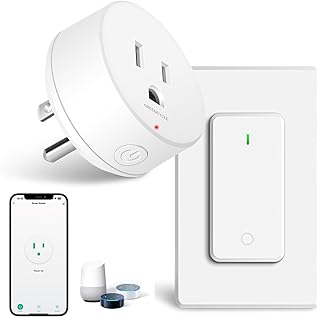
4. GreenCycle WiFi Smart Plug 15A/1500W with Remote — Tuya/Smart Life convenience (control-first)
Price and availability are accurate as of 12/26/2025 06:02 am GMT and are subject to change.
GreenCycle’s Tuya-based plug is a straightforward control device: add it to the Smart Life app, connect Alexa or Google, and you’re ready to schedule and automate. For households already standardized on Tuya, it slots in neatly with scenes, timers, and geofencing.
As listed, it does not advertise built-in energy monitoring. That means no live wattage or kWh history in the app—useful for convenience and voice control, but not for tracking costs or diagnosing high-draw devices. If your aim is consumption analytics, consider a plug with stated monitoring.
5. ELEGRP Smart In‑Wall Outlets (6‑Pack) — Whole‑home, discreet energy monitoring at the wall

Control two outlets independently via app or Alexa/Google, monitor energy use, and enjoy UL/CSA-certified safety—cut waste and simplify your home.
$89.99 on Amazon
View on AmazonPrice and availability are accurate as of 01/31/2026 12:42 am GMT and are subject to change.
If you prefer a permanent, tidy solution, ELEGRP’s in‑wall smart outlets bring monitoring and control directly into the receptacle. Because the metering happens at the outlet, you can track energy for any device you plug in—even as your gadgets change over time. It’s a practical way to monitor recurring loads like dehumidifiers, entertainment centers, or home office equipment without adding plug-in adapters.
The companion app provides energy insights alongside control features, and Alexa/Google support keeps voice and routine automation simple. Installation requires comfort with wiring; the payoff is a clean, tamper-resistant setup that makes long-term energy tracking feel built-in rather than bolted on.
6. Kasa HS103P4 Smart Wi‑Fi Plugs (4‑Pack) — Reliable automation starter set (no energy metering)

Add voice control and remote scheduling to lamps, fans and more with the HS103 Kasa smart plug — easy app setup and step-by-step guidance.
$29.99 on Amazon
View on AmazonPrice and availability are accurate as of 01/31/2026 04:25 am GMT and are subject to change.
Kasa’s HS103 series is a go-to for stable, fuss-free automation. The app is mature, schedules are reliable, and assistant integration is smooth. In a 4-pack, it’s easy to add several lamps or small appliances to your smart home in one shot.
For energy monitoring, though, this isn’t the right model. It won’t show live watts or usage history. If your goal is to reduce consumption with data-backed decisions, you’ll want a plug with explicit metering features. If you simply want robust control, Kasa’s platform is one of the most dependable.
How These Options Compare on Monitoring, Speed, and Integration
- True energy monitoring: YoLink YS6614 and ELEGRP in‑wall outlets explicitly support power usage tracking (live watts and cumulative kWh). The Govee Dual, Amazon Smart Plug, GreenCycle, and Kasa HS103 focus on control; they are not designed for in-app energy analytics.
- Reporting cadence: With YoLink, the hub architecture helps deliver frequent, reliable updates across longer distances and tougher environments. ELEGRP’s reporting frequency depends on the app’s design and network conditions but is straightforward for daily and monthly views. Control-only plugs don’t provide refresh rates because they don’t meter power.
- Ecosystem fit: All six integrate with Alexa and Google for voice and routines. YoLink’s energy data lives in the YoLink app; voice assistants primarily manage on/off and schedules. ELEGRP similarly uses its app for detailed energy views while enabling assistant-based control. Control-only plugs work well with routines, but you won’t get usage readouts in Alexa/Google.
FAQ
Q: How accurate are smart plug energy readings?
A: For models with true metering, accuracy is typically adequate for household decisions—identifying big power users, validating schedules, and estimating monthly costs. Expect small variances versus utility-grade meters. Use the plug for comparative insights and trends rather than billing-level precision.
Q: What’s the difference between “energy monitoring” and simple on/off tracking?
A: Energy monitoring measures live power (watts) and tallies consumption over time (kWh). On/off tracking logs when a device was powered but doesn’t quantify how much energy it used. If you need cost estimates or want to spot energy hogs, you need true monitoring.
Q: Do Alexa and Google show energy data directly?
A: Voice assistants typically handle control (on/off, schedules) and routines. Detailed energy charts and kWh history are viewed in the manufacturer’s app. Some ecosystems may surface limited stats, but plan to use the companion app for granular monitoring.
Q: Can I use a smart plug with heaters or heavy appliances?
A: Check the plug’s amperage and wattage ratings and compare them to the appliance’s nameplate draw. Many portable heaters push the upper limits of residential smart plugs. When in doubt, choose a device with ample overhead, avoid daisy-chaining, and follow manufacturer guidelines.
Q: Will a hub-based plug complicate setup?
A: A hub adds an extra step initially, but it can improve reliability, range, and battery life for certain sensors and plugs. YoLink’s LoRa approach is helpful in larger homes or locations where Wi‑Fi is spotty.
The Bottom Line: Pick by Data Needs, Not Just Control
If your goal is actionable energy data—live watts, kWh histories, and credible usage trends—prioritize the plugs that explicitly provide it:
- Best for rock-solid, real-time monitoring across large homes: YoLink YS6614 Smart Energy Plug. Its hub-based LoRa connectivity is resilient and keeps data flowing, even where Wi‑Fi falls short.
- Best for discreet, whole-home integration with per-outlet tracking: ELEGRP Smart In‑Wall Outlets. Ideal if you’re comfortable with installation and want monitoring built into your walls rather than added on.
If you’re primarily after reliable on/off automation with voice control—and don’t need energy analytics—these are excellent control-focused picks:
- Compact dual control for two devices in one spot: Govee Dual Smart Plug 2‑Pack.
- Alexa-first simplicity with painless setup: Amazon Smart Plug.
- Tuya/Smart Life ecosystem convenience: GreenCycle WiFi Smart Plug.
- Proven multi-pack reliability for everyday automation: Kasa HS103P4 Smart Wi‑Fi Plugs.
Choose the path that matches your goals. Want to cut costs and understand where your power goes? Go with YoLink or ELEGRP for true monitoring. Want simple, trustworthy automation and voice routines? The control-focused options will serve you well—just know you’re not gathering usage data.


Leave a Comment