

The Best Smart Plugs That Don’t Need 5GHz Wi‑Fi (And How To Avoid Dual‑Band Headaches)
If your smart plug refuses to pair because your phone is stuck on the 5GHz band, you’re not alone. Many popular plugs still connect on 2.4GHz only, while our phones and newer routers prefer 5GHz by default. The result: “Can’t connect” loops and mysterious timeouts. This guide breaks down the best 2.4GHz-only smart outlets and a few dual‑band models that sidestep these issues entirely—plus quick tips to get reliable, low‑latency control without reconfiguring your whole network.
Why 2.4GHz Still Matters (Even With Modern Routers)
2.4GHz travels farther and penetrates walls better than 5GHz. That’s why the vast majority of smart-home devices—especially budget-friendly plugs—stick with it. It’s not “old tech”; it’s the right tool for the job when a plug is behind a couch, deep in a garage, or far from the router. The trade-off is bandwidth, but smart plugs don’t need much—just a tiny, steady connection.
Mix in dual-band routers that combine 2.4GHz and 5GHz under one network name (SSID), and pairing can get confusing. Your phone may handshake over 5GHz while the plug expects 2.4GHz, and the onboarding process fails. Understanding that mismatch is step one to a quick fix.
Real-World Use Cases Where 2.4GHz Plugs Just Work
- Edge-of-home placements: Holiday lights, outdoor lamps in covered spaces, and detached garages benefit from 2.4GHz’s longer reach.
- Tight spaces: Behind media consoles or inside cabinets where signal is attenuated.
- Always-on automations: Schedules for coffee makers, fans, or dehumidifiers that need reliability more than raw speed.
Response time matters, too. Most plugs toggle in about 1–2 seconds after a voice or app command, depending on Wi‑Fi signal strength and the vendor cloud. Keep the router stable and the plug within a few rooms, and latency typically feels “instant.”
How To Shop And Avoid Dual‑Band Pairing Headaches
If you’re using a single SSID for both 2.4GHz and 5GHz, you have two paths:
- Choose a dual-band plug that can join 2.4GHz or 5GHz, removing the mismatch entirely.
- Or, pick a 2.4GHz-only plug with Bluetooth-assisted onboarding via the Smart Life app—this often “steers” setup to the correct band automatically.
Other things to weigh:
- Energy monitoring: Helpful to discover vampire loads and fine-tune schedules. Look for plugs with built-in metering if you’re optimizing energy usage.
- Form factor: Compact “mini” designs avoid blocking the second outlet.
- Safety certification: UL/CSA, ETL, and FCC marks indicate compliance with North American standards.
- App ecosystem: Many of these use Smart Life; it’s stable, widely supported, and integrates with Alexa, Google Assistant, and often SmartThings.
How We Selected These Picks
- Zero‑drama connectivity on 2.4GHz networks, with specific callouts for dual‑band support.
- Smooth app onboarding; extra points for Bluetooth-assisted pairing that reduces 2.4/5GHz confusion.
- Solid response time and reliable cloud control for everyday toggling and schedules.
- Energy monitoring options for data-driven savings.
- Safety certifications (UL/CSA, ETL, FCC) and practical form factors.
- Clear value across single, dual-outlet, and multi-pack scenarios.
1. ELEGRP Smart In-Wall Outlets (6-Pack) — Independent Control and Built-in Energy Monitoring for 2.4GHz Networks

Control two outlets independently via app or Alexa/Google, monitor energy use, and enjoy UL/CSA-certified safety—cut waste and simplify your home.
$89.99 on Amazon
View on AmazonPrice and availability are accurate as of 01/31/2026 12:42 am GMT and are subject to change.
For a clean, built-in look with real utility, ELEGRP’s in‑wall smart receptacles shine. You can control the top and bottom outlets independently, which is perfect for pairing a lamp on a sunset schedule while keeping a TV on manual control. The integrated energy monitoring is the star: track consumption over time and decide what’s worth running—and when.
These outlets work over Wi‑Fi without a hub. During setup, treat them like other 2.4GHz devices: ensure your phone is connected to the 2.4GHz band or follow the app’s guided steps. Once online, response feels snappy—typically a second or two per toggle via app or voice. Safety is robust, thanks to UL and CSA certifications and fire-resistant materials.
2. EIGHTREE Mini Smart Plug (5GHz, 15A) with Energy Monitor — Dual‑Band Relief + Compact Monitoring

Compact dual smart plug: quick setup, app or voice control, energy monitoring, scheduling and remote access to automate & save energy.
$35.99 on Amazon
View on AmazonPrice and availability are accurate as of 01/31/2026 12:42 am GMT and are subject to change.
If you’ve ever fought a 2.4GHz‑only setup on a combined SSID, this is the “no-router-tweaks” fix. EIGHTREE’s mini plug supports both 2.4GHz and 5GHz, so you can pair it wherever your phone happens to be connected. The 15A rating covers most household appliances, and the integrated energy monitoring gives you real usage data to build smarter schedules.
Day-to-day, toggles are swift and reliable through the app or voice assistants. If you’re placing a plug at the edge of your home, stick to 2.4GHz for range; otherwise, enjoy the simplicity of dual‑band onboarding. It’s a tidy, stress‑free option when you want the smallest footprint and extra insights.
3. TESSAN 2-Pack Dual-Socket Smart Plugs — Two Independently Controlled Outlets on 2.4GHz
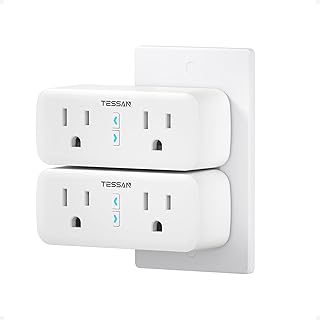
Turn lamps, coffee makers and more into smart devices—voice or app control, dual outlets, schedules and group sharing for effortless convenience.
$24.99 on Amazon
View on AmazonPrice and availability are accurate as of 01/31/2026 12:42 am GMT and are subject to change.
TESSAN’s dual-socket plug turns a single receptacle into two smart outlets, each controlled independently. It’s ideal for a coffee maker and lamp combo, or a fan and humidifier on different schedules. Because it’s 2.4GHz-only, it plays nicely with older routers and long-range placements—great for basements and garages where signal can be tricky.
Setup is straightforward, especially if you keep your phone on the 2.4GHz band during pairing. After that, response time is crisp for both sockets, and scheduling is a breeze. While there’s no energy monitoring here, the dual‑outlet flexibility often means you need fewer plugs overall—handy in tight spaces.
4. EIGHTREE Smart Plug 4-Pack — Easy 2.4GHz Pairing with Bluetooth Assist (Alexa/Google via Smart Life)

Set up in seconds with Smart Life Bluetooth, control devices from anywhere, use Alexa/Google (via app), set schedules—tiny plug won’t block the other outlet.
$20.89 on Amazon
View on AmazonPrice and availability are accurate as of 01/31/2026 12:42 am GMT and are subject to change.
If you want a fuss-free 2.4GHz setup for an older router, this EIGHTREE 4‑pack is an easy win. Bluetooth-assisted onboarding in the Smart Life app usually “steers” the process to the correct band automatically, so you’re not fighting your dual-band SSID. Once on your network, the compact form factor leaves room for the second outlet—small detail, big convenience.
Performance is consistent: taps and voice commands generally switch devices in about a second or two, and schedules run reliably. While it lacks energy metering, the multi‑pack value is excellent for whole-room conversions—think lamps, accent lighting, fans, and holiday decor all set on timers.
5. Eightree Dual-Band Smart Plug (5GHz/2.4GHz), 4-Pack — The “No More SSID Tricks” Pick

Works on 5GHz and 2.4GHz, so no router headaches. Remote app & voice control, schedules, compact certified design and 2-yr coverage. Learn more.
$35.99 on Amazon
View on AmazonPrice and availability are accurate as of 01/31/2026 12:43 am GMT and are subject to change.
If your router won’t let you split SSIDs—or you simply don’t want to—this dual-band 4‑pack is the set‑and‑forget solution. Each plug can join either band, so phone, router, and plug get along immediately. That means no temporary 5GHz disable, no walking to the far corner of the house, and no “why won’t this thing connect?” moments.
Once added, the plugs respond promptly to app and voice commands, with the usual 1–2 second toggle latency you’d expect from mainstream Wi‑Fi plugs. Timers and schedules are straightforward to set up, and the compact round design keeps adjacent outlets free. For households with modern mesh systems that don’t expose separate 2.4GHz names, this is the easiest path to reliable control.
6. EIGHTREE 4-Pack 15A Smart Plugs — Straightforward 2.4GHz Control for Higher-Draw Devices

Turn lamps and appliances on/off from anywhere, set schedules, and use Alexa/Google voice control — compact dual smart plug with easy SmartLife setup.
$20.99 on Amazon
View on AmazonPrice and availability are accurate as of 01/31/2026 12:43 am GMT and are subject to change.
These EIGHTREE plugs are a strong fit for homes that are happily 2.4GHz and want dependable everyday control. The 15A rating covers many higher-draw appliances—always check your device’s rated load and keep safety in mind. Setup is quick in Smart Life, with Bluetooth‑assisted discovery to make pairing smoother, and voice assistants are just a link away.
In daily use, on/off commands land quickly and schedules run on time. Grouping is handy to switch a whole room with one tap or voice command. If you don’t need energy data and prefer a simple, reliable 2.4GHz setup across several outlets, this 4‑pack is an easy, budget‑friendly choice.
FAQ
- Why do many smart plugs only support 2.4GHz?
- 2.4GHz travels farther and penetrates walls better. Smart plugs need minimal bandwidth but stable range, so 2.4GHz is a practical choice. It’s also simpler and often more power‑efficient for embedded Wi‑Fi chipsets.
- How fast should a smart plug respond after I tap the app or use a voice command?
- Expect about 1–2 seconds in typical conditions. Strong Wi‑Fi and a healthy internet connection keep latency low. If you’re seeing delays, move the plug closer to your router or reduce network congestion.
- I have a dual-band router with one SSID. How do I pair a 2.4GHz-only plug?
- Try one of these: temporarily disable 5GHz during setup; create a guest SSID on 2.4GHz; step farther from the router so your phone latches onto 2.4GHz; or use a plug with Bluetooth‑assisted onboarding (Smart Life app) that helps steer the process. Dual‑band plugs avoid this altogether.
- Do I need energy monitoring?
- If you want to reduce bills or understand what’s costing you most, yes. Energy-monitoring plugs surface device‑level usage, helping you identify vampire loads, set smarter schedules, and validate savings. If you just need remote control and timers, non‑monitoring plugs are fine.
- Is 5GHz “better” for smart plugs?
- Not necessarily. 5GHz can simplify pairing on modern networks, but its shorter range can be a downside at the edges of your home. For distant or obstructed locations, 2.4GHz is often the more reliable band.
Flip The Switch: Final Recommendations
- Best for in‑wall elegance plus energy data: ELEGRP Smart In‑Wall Outlets. Independent top/bottom control and built‑in metering make room-level automation easy—and you keep a clean, outlet-only look.
- Best compact dual‑band with monitoring: EIGHTREE Mini Smart Plug (5GHz, 15A). If you want to avoid dual‑band SSID theatrics and still track energy, this is the painless, space‑saving choice.
- Best value 2.4GHz multi‑room starter: EIGHTREE Smart Plug 4‑Pack (2.4GHz). Bluetooth‑assisted pairing takes the sting out of 2.4GHz setup, and the tiny design leaves your second outlet open.
- Best for mixed/mesh networks that refuse to split SSIDs: Eightree Dual‑Band Smart Plug (5GHz/2.4GHz), 4‑Pack. The most straightforward fix for “won’t connect” headaches on modern routers.
- Best dual-outlet flexibility on one receptacle: TESSAN 2‑Pack Dual‑Socket Smart Plugs. Two independently controlled outlets are ideal for paired routines without doubling your hardware.
- Best basic 2.4GHz 15A set for higher‑draw devices: EIGHTREE 4‑Pack 15A Smart Plugs. Reliable, quick to set up, and built for everyday control—no energy data, just rock‑solid timers and toggles.
Bottom line: If your router setup makes 2.4GHz pairing a chore, pick a dual‑band plug and be done. If you’re on an older or long‑range 2.4GHz network, choose a plug with Bluetooth‑assisted onboarding to keep setup simple. Either way, you’ll enjoy dependable response times, smarter schedules, and—where available—energy insights that pay for themselves over time.






Leave a Comment