

The Best Smart Home Hubs (and Hub‑Ready Gear) for a Reliable, Future‑Proof Setup
Ever notice how the “smart” in smart home feels more like “fragile” when your lights take a beat to respond? That lag isn’t just annoying—it’s a sign your hub strategy needs work. The right hub (and a few strategic hub‑friendly devices) turns scattered gadgets into a cohesive, fast, and private system you can trust.
Below, we focus on Zigbee coordinators that anchor a responsive, local‑first smart home—plus a few excellent Zigbee/Thread devices that strengthen your mesh and unlock richer automations.
Why hubs still matter in a Matter world
Matter is promising—and improving quickly—but it isn’t a complete replacement for purpose‑built home automation hubs. Here’s why:
- Reliability and local control: Zigbee and Z‑Wave were built for smart homes from the ground up, using low‑power mesh networks that keep working even when the internet blips.
- Range and battery life: Battery sensors (leaks, doors, buttons) thrive on Zigbee’s low energy profile and mesh repeaters. Wi‑Fi can’t match that efficiency at scale.
- Advanced automation: Platforms like Home Assistant and Zigbee2MQTT expose deep device parameters and events that cloud-first apps often hide.
For many households, the sweet spot is a Zigbee hub feeding into a controller like Home Assistant—then bridging into Matter for Apple/Google/Amazon multi‑ecosystem control when you want it.
Common use cases that benefit from a dedicated hub
- Whole‑home lighting: Zigbee in‑wall switches and smart plugs act as mesh routers, stabilizing the network for groups, scenes, and motion‑based lighting.
- Sensor‑driven automations: Zigbee door, motion, temperature, and leak sensors trigger local automations instantly—even if Wi‑Fi misbehaves.
- Blinds and comfort: Thread/ Zigbee/ Z‑Wave shades and thermostats add quiet, precise control; schedules and sun‑tracking scenes boost comfort and efficiency.
- Hybrid ecosystems: Run everything locally in Home Assistant, then expose select devices to voice assistants or phone apps via Matter, Alexa, Google Home, or HomeKit.
How to shop for a hub (and hub‑friendly devices)
- Protocols and radios: Choose a Zigbee 3.0 coordinator with a strong antenna. If you need Z‑Wave or Thread, pair compatible devices or a multi-protocol gateway—but don’t mix radios on a single dongle unless you know it’s well supported.
- Ecosystem path: Confirm your path to Alexa, Google Home, or HomeKit. With Home Assistant, you can keep control local and still bridge into those ecosystems.
- Antenna and layout: Place the Zigbee coordinator away from 2.4 GHz noise (USB 3.0 ports, routers). A simple USB extension cable can dramatically improve range and reliability.
- Firmware and community: Choose hardware with a documented workflow, ongoing firmware updates, and an active Zigbee2MQTT/ZHA user base.
- Mesh design: Plan for mains‑powered Zigbee routers (smart plugs, switches) spread across rooms and floors. Your mesh is only as strong as its routing backbone.
Our selection criteria
- Strong Zigbee 3.0 performance and antenna design
- Easy setup with Home Assistant’s ZHA or Zigbee2MQTT
- Local, private control with options to integrate Alexa/Google/HomeKit
- Proven reliability with large device counts (given a healthy mesh)
- Clear documentation, firmware support, and an active community
- Practical value for building a robust, scalable smart home
Quick comparison: protocols, ecosystems, and standout features
| Product | Type | Radio | Works w/ | Ecosystem | Local | Features | Best use |
|---|---|---|---|---|---|---|---|
| SONOFF Zigbee 3.0 USB Dongle Plus-E | USB coord. | Zigbee 3.0 | HA, Z2M, ioBroker | Alexa / Google / HomeKit (HA) | Yes | Ext. antenna; stable mesh | Large Zigbee meshes |
| SONOFF Zigbee 3.0 USB Dongle Plus | USB coord. | Zigbee 3.0 | HA, Z2M, ioBroker | Alexa / Google / HomeKit (HA) | Yes | Mature firmware | Proven DIY setups |
| SMLIGHT SLZB-07p7 | USB coord. | Zigbee 3.0 | HA, Z2M | Alexa / Google / HomeKit (HA) | Yes | Pre-flashed; strong RF | Fast plug-and-play |
| EIGHTREE Zigbee Plug (4-pack) | Smart plug | Zigbee 3.0 | Alexa, HA, ST | Via hub | Yes | Energy + repeater | Extend Zigbee range |
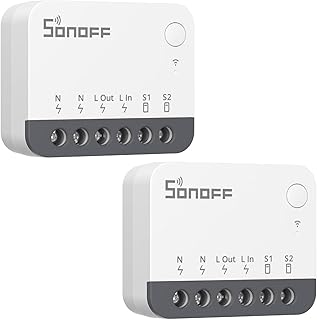
| SONOFF ZBMINIR2 (2-pack) | In-wall sw. | Zigbee 3.0 | HA, ST hubs | Via hub | Yes | Compact; keeps switch | Switch retrofits |
| SmartWings Motorized Shade | Motor shade | Thread / Z-Wave | HomeKit, Alexa | Multi-eco | Yes | Quiet motor | Smart window scenes |
1. SONOFF Zigbee 3.0 USB Dongle Plus‑E — Reliable Zigbee core with Silicon Labs radio

Price and availability are accurate as of 12/22/2025 03:11 am GMT and are subject to change.
This is a well‑rounded Zigbee coordinator for Home Assistant users who want a dependable, scalable Zigbee network. The Plus‑E’s Silicon Labs EFR32 chipset pairs nicely with both ZHA and Zigbee2MQTT, delivering stable performance once you give it good RF conditions (distance from USB 3.0 ports and 2.4 GHz noise).
Ideal user: anyone building a large, mixed‑brand Zigbee network—sensors, plugs, switches, shades—who values local control and open‑source tooling. While it’s Zigbee‑only, you can still unify your experience: run everything locally in Home Assistant and expose selected devices to Alexa, Google Home, or HomeKit. The only must‑do is mesh planning; add a few mains‑powered routers and this coordinator will hum along.
2. SONOFF Zigbee 3.0 USB Dongle Plus — Community‑favorite TI CC2652 coordinator

Price and availability are accurate as of 12/22/2025 03:11 am GMT and are subject to change.
The original SONOFF “Plus” dongle is a staple in DIY smart homes for good reason. The TI CC2652 family is widely documented, making troubleshooting and firmware management straightforward. With Zigbee2MQTT in particular, you’ll get deep device support, fine‑grained control, and excellent visibility into your mesh.
Choose this if you prefer TI’s mature ecosystem and want the comfort of countless guides and forum posts. It’s an easy recommendation for users migrating away from fragmented brand hubs into a single, local‑first system. Add it to a small mini PC or Raspberry Pi running Home Assistant and you’ll have a flexible hub with room to grow.
3. SMLIGHT SLZB‑07p7 Zigbee 3.0 USB Coordinator — Plug‑and‑play, pre‑flashed

Price and availability are accurate as of 12/22/2025 03:11 am GMT and are subject to change.
If you want to spend less time flashing firmware and more time automating, the SLZB‑07p7 is appealing. It arrives ready for ZHA or Zigbee2MQTT, with a case and antenna designed to maximize link quality. The CC2652P7 radio is well regarded for range and stability when paired with a good mesh of routers.
This is a strong pick for first‑time Home Assistant users who want an almost turnkey Zigbee backbone, and for experienced users who appreciate hardware that just works. You’ll still want a USB extension cable and some mains‑powered routers nearby, but out of the box it’s a capable coordinator for homes with dozens of sensors and switches.
4. EIGHTREE Zigbee Smart Plug 15A (4‑Pack) — Strengthen your mesh and track energy
Price and availability are accurate as of 12/22/2025 03:11 am GMT and are subject to change.
Smart plugs are more than on/off control—they’re the backbone of a healthy Zigbee mesh. This 4‑pack pulls double duty: each plug repeats traffic for nearby sensors and switches while giving you energy monitoring to identify power hogs or verify automations. Spread them around your home (hallways, kitchen, near sensors) and watch your Zigbee reliability improve.
Choose these if you’re starting a Zigbee network and want quick wins: stabilized routing plus practical automations (schedule dehumidifiers, disable space heaters when you leave, or power‑cycle networking gear). They’re compatible with Home Assistant, Alexa, and SmartThings via your chosen hub.
5. SONOFF ZBMINIR2 ZigBee Smart Light Switch (2‑Pack) — Keep your wall switch, gain smart control

Price and availability are accurate as of 12/22/2025 03:11 am GMT and are subject to change.
In‑wall modules are a great way to make existing light circuits smart without changing the look of your wall plates. The ZBMINIR2 fits behind a standard switch, letting you keep manual control while automations handle the rest. Because it’s mains‑powered, it also strengthens your Zigbee mesh as a router—two wins with one install.
This is an ideal pick for whole‑home lighting—hallways, bedrooms, and bathrooms—where local responsiveness matters. Connect it to Home Assistant or a compatible Zigbee hub, then build scenes, motion triggers, or nighttime automations. Just confirm you have a neutral wire in the switch box before purchasing.
6. SmartWings Motorized Window Shade — Quiet, hub‑friendly comfort with Thread or Z‑Wave

Price and availability are accurate as of 12/22/2025 03:11 am GMT and are subject to change.
Window shades are high‑impact upgrades: they tame glare, boost privacy, and drive meaningful energy savings when tied to temperature and sun position. SmartWings offers motor options that integrate with HomeKit (via Thread) or Z‑Wave ecosystems—so you can keep control local and align with your existing hub. In a Home Assistant setup, Z‑Wave or Thread variants slot neatly into scenes and automations.
Ideal for anyone building comfort‑first routines: morning wake‑ups, movie nights, heat‑mitigation, or security‑style randomization when you’re away. Pair with motion and light sensors to adjust automatically throughout the day, no phone needed.
FAQ
- Do I need a separate hub if I plan to use Matter?
Matter is growing fast, but Zigbee and Z‑Wave still deliver excellent battery life, range, and local reliability—especially for sensors and lighting. A Zigbee hub plus Home Assistant can run locally today and still bridge devices into Matter for Apple/Google/Amazon control.
- ZHA or Zigbee2MQTT—which should I choose?
Both are excellent. ZHA is tightly integrated with Home Assistant and simple to set up. Zigbee2MQTT offers extremely broad device support and detailed control. If you want “just works,” pick ZHA; if you love tinkering and deep device features, try Zigbee2MQTT.
- How many routers do I need in my Zigbee mesh?
Plan at least one mains‑powered router per room or every 6–9 meters, more for dense walls. Smart plugs and in‑wall switches make great routers. Place them between your coordinator and clusters of battery sensors.
- Why does everyone recommend a USB extension cable for Zigbee dongles?
USB 3.0 ports and Wi‑Fi gear can swamp the 2.4 GHz band. A short USB extension moves your coordinator away from noise, dramatically improving link quality and stability.
- Can I mix Zigbee, Z‑Wave, and Thread in one home?
Absolutely. Many users run a Zigbee coordinator for sensors and lights, a Z‑Wave stick for locks and shades, and Thread for HomeKit accessories. Home Assistant can unify these under one interface and expose select devices to voice assistants.
Putting it all together: Picks for different smart homes
If you want one sentence of advice: start with a reliable Zigbee coordinator, lay down a few mains‑powered routers, and build from there.
- Best all‑around Zigbee core: SONOFF Zigbee 3.0 USB Dongle Plus‑E. A dependable Silicon Labs platform with excellent stability for larger networks.
- Best for documentation and community: SONOFF Zigbee 3.0 USB Dongle Plus. The TI CC2652 ecosystem has an enormous knowledge base and proven longevity.
- Easiest to get running fast: SMLIGHT SLZB‑07p7. Pre‑flashed and tuned for ZHA/Zigbee2MQTT with strong RF hardware.
- Best mesh builders: EIGHTREE Zigbee Smart Plug 4‑Pack and SONOFF ZBMINIR2. They function as routers and add everyday automations.
- Best comfort upgrade: SmartWings Motorized Window Shade. Choose Thread for HomeKit‑friendly setups or Z‑Wave for multi‑hub homes.
Smart homes feel magical when they’re local, fast, and predictable. With a solid Zigbee hub at the center and a few strategic routers, your automations will run on schedule—and your lights will finally turn on the moment you ask.






Leave a Comment