

The 7 Best USB Gaming Microphones for PS5 and Console Streaming
The fastest way to make your stream sound “pro” isn’t a new camera—it’s a proper mic. Viewers will forgive a frame hiccup; they bounce the moment your voice gets thin, noisy, or hard to hear. The good news: a modern USB microphone can plug straight into your console, deliver broadcast‑grade clarity, and look incredible on camera.
Below you’ll find seven standout USB mics that shine for PS5 streaming and console broadcast use. We prioritized clean pickup, instant mute controls, and gaming-friendly aesthetics—because your setup should sound great and look the part.
Why this category matters for console creators
Voice is your brand. Whether you’re shout‑casting clutch plays or guiding an audience through long RPG sessions, consistent, intelligible vocal tone keeps people tuned in. A dedicated USB mic isolates your voice from controller clicks, fans, and room echo far better than a headset boom.
Console streaming has also matured. With native broadcast apps, party chat integration, and Discord support, your microphone choice now directly affects viewer retention, team comms, and VOD quality. A broadcast‑ready USB mic gives you a “studio anchor” for all of it—without a PC, mixer, or drivers.
Common console use cases (and what you need for each)
- Solo streams direct from PS5: You want a cardioid mic that rejects room noise, a fast hardware mute, and a way to position the capsule near your mouth. A boom arm or tall stand helps keep the mic off‑screen but close.
- Party chat and Discord: Clear voice pickup plus quick mute is essential. If your mic includes a headphone jack with direct monitoring, you’ll hear your voice naturally while chatting, which helps control speaking volume.
- Capturing content with a capture card: USB mics still excel here. Set the console’s input to your USB mic, and if you route audio to a capture device/PC, you keep the same quality on the recording.
- Mixed lighting setups: RGB accents can match your keyboard, case, and LED panels. Neutral, matte finishes blend into minimal “camera-first” rigs.
How to shop for a PS5 streaming microphone
PC specs don’t matter; connection and control do. Prioritize:
- USB-C or USB-A plug‑and‑play compatibility with PS5/PS4.
- A cardioid pickup pattern to focus on your voice and reduce background noise. Multi‑pattern mics add flexibility for group streams and off‑axis rejection tweaks.
- On‑mic controls: a fast mute, gain knob or dial, and (ideally) a headphone jack for zero‑latency monitoring.
- Isolation: a built‑in shock mount or included boom arm to keep desk vibrations out of your stream.
- Pop protection: internal foam or an external pop filter to tame plosives on close‑mic speech.
- Aesthetic fit: clean lines, RGB options, or white/black variants to complement your rig.
Setup tips most creators overlook
- Distance and angle: Place the capsule 6–10 inches from your mouth, slightly off‑axis (about 20–45 degrees) to reduce breath pops and “S” harshness.
- Gain staging: Set mic gain so normal speech peaks are healthy but not clipping. On PS5, check Accessories > Audio while speaking; aim for strong, non-red levels.
- Room noise: Turn off loud fans nearby, use cardioid, and keep gain conservative. Closer mic placement lets you run lower gain and cut background noise further.
- Monitoring: If your mic has a headphone jack, use it for immediate sidetone so you can catch mouth sounds, plosives, or over‑sibilance in real time.
- Mounting: A boom arm frees desk space and keeps you in the “sweet spot,” even if you move during intense gameplay.
Our selection criteria
- Clear, natural voice capture with good noise rejection at typical console distances
- Fast, reliable mute control with visible status
- USB plug‑and‑play on PS5/PS4 and cross‑platform flexibility
- On‑board gain or pattern controls that don’t require software
- Isolation (shock mount) and/or included arm for vibration control
- Headphone monitoring when available (preferred)
- Stream‑worthy aesthetics (RGB or clean, modern finishes)
- Strong build quality and dependable brand support
- Genuine value for console streamers upgrading from a headset mic
1. HyperX QuadCast 2 USB-C Microphone — Streaming & Podcasting Mic with On-Board Controls and Removable Shock Mount

Price and availability are accurate as of 12/25/2025 10:39 pm GMT and are subject to change.
HyperX refined a proven streaming formula with the QuadCast 2: fast controls, clean pickup, and a look that complements any console rig. The on-board mute and gain controls make live adjustments easy, and the visible status indicator prevents the classic “you’re muted” moment mid‑match. A removable shock mount adds real utility, cutting keyboard and controller vibrations before they hit your audio.
For PS5 creators who want a broadcast‑polished voice without learning a DAW, the QuadCast 2 hits the sweet spot. It’s a step up from entry‑level options with more control, but remains simple enough for plug‑in-and-go streaming. If you plan to eventually add an audio interface, note this stays USB‑only—great for consoles now, less flexible for pro XLR chains later.
2. HyperX QuadCast S — RGB USB Condenser Microphone for Streaming, Gaming & Podcasting

Eye-catching RGB USB mic with built-in shock mount, pop filter, tap-to-mute, 4 pickup patterns and headphone monitoring—stream-ready sound and style.
$109.99 on Amazon
View on AmazonPrice and availability are accurate as of 01/28/2026 08:32 pm GMT and are subject to change.
The QuadCast S is the “show mic” of the HyperX lineup—studio function with signature RGB flair. Its multi‑pattern design adds serious versatility: run cardioid for solo streams, switch to omnidirectional or bidirectional if you occasionally co‑host or record interviews. The integrated shock mount and internal pop filter are big quality-of-life wins when you talk close to the capsule for maximum presence.
On PS5, you get dead‑simple USB connectivity and intuitive touch‑mute control that’s visible at a glance. If you want your mic to be both centerpiece and workhorse, QuadCast S delivers that “broadcast desk” presence while keeping controls within finger reach. Creators who prefer an understated, minimal aesthetic might want a non‑RGB finish—but for most gaming setups, the lighting steals the show in the best way.
3. HyperX QuadCast S RGB USB Condenser Mic — Built‑in Shock Mount & 4 Polar Patterns (White)

Price and availability are accurate as of 12/25/2025 10:39 pm GMT and are subject to change.
Prefer a bright, modern look? The white QuadCast S gives you the same multi‑pattern power and streamlined controls as the standard model, wrapped in a finish that matches the PS5 aesthetic. It’s a visual upgrade that keeps your stream uniform and stylish without sacrificing performance.
You still get the essentials that matter for console streaming: responsive mute control, easy gain access, and isolation that keeps desk hum and taps from polluting your voice. If you film in a minimalist set or want a mic that complements white peripherals and panels, this is the most cohesive choice. Just plan on regular wipe‑downs to keep that pristine look camera‑ready.
4. FIFINE AmpliGame A8T USB Gaming Microphone Kit — RGB, Mute & Gain Knob with Metal Boom Arm

Price and availability are accurate as of 12/25/2025 10:39 pm GMT and are subject to change.
For creators who want everything in one hit, the A8T kit is excellent value. You get a metal boom arm to place the mic where it sounds best—close to your mouth and off your desk—plus a shock mount to reduce thumps. The on‑mic gain and mute mean you’re not diving into menus mid‑fight to fix levels or silence during a cough.
On PS5, setup is as easy as plugging in and selecting the mic as your input. Positioning with the included arm is the real win: better mic placement lets you run lower gain, which slashes room noise and keyboard chatter. If you move a lot on stream, take a moment to lock the arm’s joints—less flex equals cleaner audio and a safer mic.
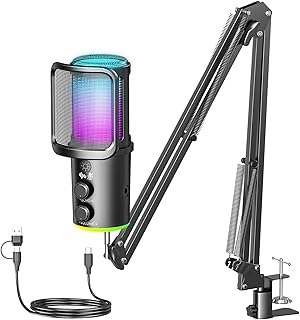
5. Gaming USB Condenser Mic with Noise Cancellation, Boom Arm & Monitoring for Streaming/Podcasting (PC/PS4/PS5/Mac)
Price and availability are accurate as of 12/25/2025 10:39 pm GMT and are subject to change.
If your room is less than ideal—ceiling fans, a lively household, or a gaming laptop nearby—a mic with onboard noise cancellation can be a lifesaver. This model’s hardware toggle reduces ambient hiss and hum, while the included boom arm and shock mount help you optimize mic distance and isolation from desk knocks.
The monitoring jack is especially useful for console streaming; direct sidetone lets you hear exactly what your audience hears without latency. Use the noise‑cancellation sparingly: run the mic close, set gain once, then add just enough reduction to control background without hollowing out your voice. It’s a pragmatic, feature‑rich option for creators who need the most help taming their environment.
6. FIFINE AmpliGame USB Gaming Microphone — Quick Mute & RGB for Streaming (PC/PS5)

Price and availability are accurate as of 12/25/2025 10:39 pm GMT and are subject to change.
The AmpliGame line is popular for good reason: you get a clean cardioid capsule, fast mute control, and plug‑and‑play simplicity—all in a compact body that doesn’t dominate your facecam. It’s a straightforward upgrade from a headset mic that immediately improves clarity and rejection of off‑axis noise.
On PS5, you’ll appreciate how quickly it just works. Pair it with an affordable boom arm for best results, and you’ll cut desk rumble while placing the mic where your voice sounds fullest. If you want deeper control (multi‑patterns, onboard EQ, or built‑in monitoring), consider the brand’s kits or step up to a higher‑end model; otherwise, this is a painless path to “my stream finally sounds good.”
7. HyperX SoloCast USB Condenser Microphone — Tap-to-Mute with Cardioid Pattern for Streaming & Gaming (PC/PS4/PS5/Mac)

Price and availability are accurate as of 12/25/2025 10:40 pm GMT and are subject to change.
If you want a reliable starter mic that nails the basics, SoloCast is the quiet hero. The cardioid pattern locks onto your voice, the touch‑mute is fast and intuitive, and the compact form factor fits under monitors or on short arms without crowding your shot. For console streamers upgrading from a controller or headset mic, it’s a night‑and‑day difference in intelligibility and presence.
Because it’s so small, placement is everything—get it 6–8 inches from your mouth, and you’ll be rewarded with a full, focused sound with less room noise. If you don’t need RGB or multi‑pattern flexibility, this is an easy recommendation that keeps your workflow friction‑free.
FAQ
- Will these USB mics work on PS5?
Yes. Plug the USB cable into the PS5. Go to Settings > Sound > Microphone and select the mic as your Input Device. Adjust Input Volume while speaking to set a healthy level without clipping.
- How do I hear myself (monitoring) on PS5?
If your mic has a headphone jack with direct monitoring, plug your headphones into the mic for zero‑latency sidetone. Without a mic jack, use your regular headset and PS5 chat settings; just note you won’t hear your own voice unless the headset or app provides sidetone.
- Do I need an audio interface or mixer?
No. All picks here are USB mics designed for plug‑and‑play use. An interface is only necessary for XLR microphones or advanced multi‑source mixing.
- What’s the best way to reduce background noise?
Use a cardioid pattern, place the mic close to your mouth, lower gain, and mount it on a boom arm or shock‑isolated stand. Turn off nearby fans, and angle the mic slightly off‑axis to minimize breath pops and keyboard noise.
- Can I use these mics with a capture card or PC later?
Absolutely. USB mics are flexible. You can connect to a PC for OBS/Discord or pair with a capture card. If you plan to move to a full studio chain later, know these are USB‑only, not XLR.
The Final Call: Sound Like You Mean It
You don’t need a studio to sound like a pro. You need the right USB mic, smart placement, and instant control during the heat of a match.
- Best all‑around for console creators: HyperX QuadCast 2. It blends on‑mic controls, solid isolation, and console‑friendly simplicity.
- Best “showpiece” with flexibility: HyperX QuadCast S. Want RGB drama plus multi‑pattern options? This is your centerpiece.
- Best for white/clean builds: HyperX QuadCast S (White). Same performance, cohesive aesthetics for PS5‑themed rigs.
- Best complete starter bundle: FIFINE AmpliGame A8T Kit. Boom arm, shock mount, gain, and mute in one box.
- Best for tough rooms: Gaming USB Condenser Mic with Noise Cancellation. Hardware noise reduction and direct monitoring help tame chaos.
- Best compact value: FIFINE AmpliGame USB. A tiny footprint with quick mute that drastically cleans up voice clarity.
- Best “set and forget” minimal mic: HyperX SoloCast. Small, reliable, and easy to place out of frame.
Pick the mic that fits your space, your style, and the way you stream. Get it close, set levels once, and focus on the fun—your audience will hear the difference immediately.






Leave a Comment