

The Best Quiet, Hot‑Swappable Mechanical Keyboards for Programmers
If you spend all day inside an IDE, your keyboard becomes more than a peripheral—it’s your instrument. A satisfying, precise keystroke can mean fewer typos, less fatigue, and an almost meditative rhythm when you’re deep in flow. But in shared offices and late-night coding sessions, loud clicky boards won’t cut it. That’s where quiet, hot‑swappable mechanical keyboards shine: you get tactile feedback, noise control, and the flexibility to swap switches as your preferences evolve.
Below is a roundup tailored to developers who value ergonomics, quiet operation, and layouts that streamline coding. All six picks balance performance with practicality, so you can focus on shipping code—not fighting your keyboard.
Why “quiet” and “hot‑swappable” really matter for coders
Constant typing magnifies small comfort issues. Tactile, non‑clicky switches (think “Brown”-style) help you feel actuation without the sharp report that irritates coworkers or housemates. Quieter acoustics also lessen fatigue; your brain isn’t subconsciously reacting to sharp, percussive sounds for hours on end.
Hot‑swap sockets turn your board into a long‑term platform. Start with smooth pre‑lubed switches and, if you decide you want a quieter or more tactile feel later, pop in silent linears or a different tactile set—no soldering required. It’s a low‑risk path to dialing in your dream feel.
Layouts and ergonomics that make coding easier
Keyboard size impacts both ergonomics and efficiency:
- 60%: Ultra‑compact; great for small desks and travel. You’ll rely on layers for navigation and function rows, which can be fast once learned but has a learning curve.
- 75%: A sweet spot for many developers—compact footprint with arrows, function row, and often a handy volume knob.
- 96–98%: Nearly full‑size with a numpad in a tighter chassis. Ideal if you live in spreadsheets, work with data, or like dedicated keys for macros.
Ergonomically, look for:
- A gentle typing angle and the option to use a wrist rest.
- Gasket or damped mounting for a softer bottom‑out and quieter acoustics.
- PBT keycaps for better grip and longer‑lasting legends.
Switch feel, sound, and why pre‑lubed helps
For quiet tactile feedback, “Brown”‑style switches are the popular middle ground. They provide a bump you can feel without the click you can hear across the room. Pre‑lubed switches and stabilized keys (Enter, Space) reduce scratch and rattle, making your board sound more polished out of the box.
If you need near‑silence, consider silent linears. Hot‑swap boards let you experiment—drop a silent set in if your office is noise‑sensitive and keep a tactile set for home.
Connectivity, OS compatibility, and workflow
Multi‑mode wireless (Bluetooth and/or 2.4 GHz) plus USB‑C wired keeps you flexible—pair with your laptop, hop on a KVM, or plug in for zero‑latency debugging. Most modern mechanical keyboards work with Windows, macOS, and Linux over standard HID. If a brand’s configurator isn’t cross‑platform, you can still remap at the OS level (Karabiner‑Elements for macOS, tools like xkb for Linux, PowerToys on Windows).
Our selection criteria
- Quiet-first: stock or switch‑swappable paths to low‑noise typing.
- Hot‑swappable sockets (where applicable) for easy experimentation.
- Layouts that power coding: 60%, 75%, and compact full layouts with arrows and function layers.
- Ergonomics: comfortable angle, damped acoustics, stable larger keys.
- Wireless reliability and wired performance.
- Solid materials: PBT keycaps, sturdy cases, thoughtful mounting.
- Sensible software and OS compatibility for macOS/Linux/Windows.
- Long‑term value and mod‑friendliness for developers who tinker.
Below are six strong options, each with a clear use case for coders.
1. RK Royal Kludge R98 Pro — compact 98% workhorse with knob and PBT caps
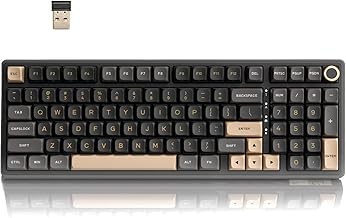
Compact 98% mechanical keyboard with 3-mode wireless, 365-hr battery, gasket softness, hot-swappable pre-lubed switches, ready to customize?
$79.99 on Amazon
View on AmazonPrice and availability are accurate as of 01/28/2026 10:23 pm GMT and are subject to change.
A developer‑friendly take on a full keyboard, the R98 Pro squeezes a numpad into a compact chassis—great if you parse logs, crunch data, or work in tools that benefit from number entry while keeping the mouse closer in. The dedicated knob makes muting during stand‑ups or tweaking volume mid‑pair‑session effortless, and PBT keycaps hold up under heavy use.
For quiet coding, its hot‑swappable sockets let you slot in tactile Browns or silent linears without touching a soldering iron. The multi‑mode connection fits most workflows—Bluetooth or 2.4 GHz when you’re moving around, wired when you want zero fuss. On macOS/Linux, standard HID works out of the box; remap a few keys and you’re set.
2. AULA F87 (75%) — efficient layout, pre‑lubed smoothness, and hot‑swap flexibility

Price and availability are accurate as of 12/26/2025 05:01 am GMT and are subject to change.
For programmers who crave a compact yet complete setup, the F87 nails the balance. You get arrows, F‑keys, and a clean case that doesn’t sprawl across your desk. Pre‑lubed switches smooth out the sound profile and reduce scratchiness—ideal for open offices or shared spaces where quieter is kinder.
Hot‑swap sockets future‑proof the board: start with a tactile set for feedback in your editor, then try silent linears if you need stealth mode. Wireless options keep your desk uncluttered, while a USB‑C cable is there when you want it. It’s a practical, mod‑friendly workbench for coding that won’t crowd your monitor stand or mouse mat.
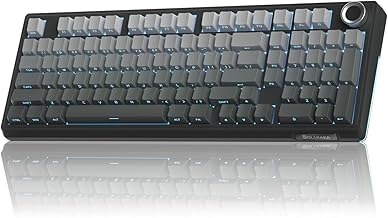
3. SOLAKAKA KI99 Pro (96%) — full features in a tight chassis with gasket damping
Price and availability are accurate as of 12/26/2025 05:01 am GMT and are subject to change.
If you code and crunch numbers—or just like the efficiency of dedicated keys—the KI99 Pro’s compact full layout is a joy. Its gasket structure adds give to keystrokes, which can reduce fatigue and produce a deeper, calmer sound signature. Pre‑lubed switches help keep stabilizer keys like Space and Enter from sounding harsh.
Because it’s hot‑swappable, you can tune the acoustic and tactile profile to your liking—quiet tactiles for feedback, silent linears for stealth. Wireless connectivity makes moving between a laptop and desktop painless, while USB‑C wired stays latency‑free. For macOS or Linux users, the standard layout and HID support make it a straightforward daily driver.
4. Redragon K742 — wireless, hot‑swappable with a numpad and media knob

Silent, creamy keystrokes with hot-swappable switches, tri-mode wireless for 3 devices, compact 98% layout and programmable QMK/VIA, perfect for work or play.
$64.99 on Amazon
View on AmazonPrice and availability are accurate as of 01/31/2026 01:22 am GMT and are subject to change.
When your workflow demands a full stack of keys—function row, nav cluster, and numpad—the K742 delivers without making you live with a fixed sound or feel. Out of the box it’s linear and smooth; hot‑swap sockets mean you can switch to Brown‑style tactile or silent linears to dial in a quieter profile in minutes.
The knob is more useful than it sounds: mute the mic during a stand‑up, tweak volume in a live demo, or scrub through a video tutorial. Wireless keeps your desk clean, wired keeps latency predictable. It’s a practical, value‑minded platform for developers who won’t give up a numpad but still want modern ergonomics and sound control.
5. Redragon K630 Dragonborn (60% wired) — compact, Brown tactiles, and budget‑friendly

Price and availability are accurate as of 12/26/2025 05:01 am GMT and are subject to change.
If you want a quiet‑leaning, tactile feel at an approachable entry point, the K630 hits the essentials. Brown switches provide feedback without clickiness, and the compact 60% layout frees up space for wide mouse arcs or a tablet next to your laptop. It’s a solid pick for travel, coffee‑shop coding, or small desks.
You’ll rely on layers for arrows and function keys, which many developers acclimate to quickly—once the muscle memory lands, it can even be faster. The trade‑off: no hot‑swap, so switching to silent linears later means trying a new board. Still, as a quiet, tactile, wired workhorse, it’s hard to argue with its practicality.
6. YUNZII B75 PRO (75%) — gasket‑mounted, hot‑swappable, and pre‑lubed for quiet polish

Price and availability are accurate as of 12/26/2025 05:01 am GMT and are subject to change.
The B75 PRO delivers a coder’s sweet spot: arrows, F‑row, and a media knob in a trim chassis that’s comfortable for long sessions. Its gasket mounting adds softness to bottom‑out and helps damp case noise, while pre‑lubed switches and quality stabilizers keep the sound pleasant and office‑friendly.
As a hot‑swap board, it’s ready for a quiet‑first setup. Want a tactile bump without extra volume? Drop in Brown‑style switches. Need near‑silence? Try silent linears. With wireless for flexibility and USB‑C for stability, it’s equally at home on macOS, Linux, and Windows—just set your preferred keymap and go. If you code all day and appreciate refined acoustics, this one’s a compelling daily driver.
FAQ
- What switch type is best for quiet programming?
- For quiet with feedback, tactile “Brown”‑style switches are the go‑to. They provide a discernible bump without click noise. If you need near‑silence, choose silent linear switches. Hot‑swappable boards make it easy to try both.
- 60%, 75%, or 96–98%: which layout should I pick?
- 60% is ultra‑compact but relies on layers for arrows and function keys. 75% keeps arrows and F‑row with minimal footprint—great for most coders. 96–98% adds a numpad in a tighter frame, ideal for data work or heavy numeric input.
- Will these keyboards work on macOS and Linux?
- Yes, they connect over standard USB or Bluetooth HID, so typing works out of the box. If the vendor software is Windows‑only, use OS‑level tools (e.g., Karabiner‑Elements on macOS, xkb on Linux) to remap keys, swap Ctrl/Caps, or add layers.
- How do I make my mechanical keyboard even quieter?
- Combine quieter switches (tactile Browns or silent linears) with good stabilizer tuning and PBT keycaps. Consider adding a desk mat, lowering RGB brightness, and using a wrist rest to encourage lighter bottom‑outs. Gasket/damped boards also help.
- Are hot‑swappable sockets durable for daily coding?
- Quality hot‑swap sockets are designed for many insertions. Use a proper switch puller, pull straight up, and avoid forcing pins. Once the switch is seated, day‑to‑day typing is as reliable as a soldered board.
The Developer’s Shortlist: Pick Your Perfect Board
- Best compact full‑featured: RK Royal Kludge R98 Pro — you get a numpad, arrows, and a knob without a desk‑hogging frame. Ideal for data‑heavy coding in shared spaces.
- Best balanced all‑rounder (75%): YUNZII B75 PRO — gasket‑mount, pre‑lubed smoothness, and a knob in a practical coder’s layout.
- Best value 75% hot‑swap: AULA F87 — efficient, quiet‑leaning, and mod‑friendly without the price creep.
- Best quiet full layout with flexibility: SOLAKAKA KI99 Pro — compact full‑size with gasket damping for comfortable, lower‑noise sessions.
- Best full‑size with media control: Redragon K742 — knob control plus hot‑swap freedom for tailoring your acoustic profile.
- Best budget compact tactile: Redragon K630 Dragonborn — wired, Brown tactiles, and a tiny footprint when hot‑swap isn’t essential.
The bottom line: prioritize a layout that matches your workflow, choose a quiet switch path, and keep hot‑swap in your toolkit so you can iterate on feel without replacing the whole board. When your keyboard fades into the background and your code takes the spotlight, you’ve picked the right one.








Leave a Comment