

Finding a mechanical keyboard that truly “speaks Mac” can feel like an endless compromise. You want a native macOS layout with Option/Command in the right places, a proper F1–F12 function row for volume and media, and a USB‑C connection that looks at home next to a MacBook or Studio Display. The good news: the boards below deliver those essentials without asking you to give up modern mechanical niceties like hot‑swaps, gasket mounts, or wireless.
Below, I’ll walk through what to look for, why macOS‑native layouts matter, and the best picks that balance typing feel, macOS convenience, and clean desk aesthetics.
Why a Mac layout mechanical keyboard matters
- Consistency saves time. If you’ve spent years on Apple’s Magic Keyboard, your muscle memory expects Command next to the spacebar and media control on the function row. A true Mac layout (with Option/Command legends and macOS mode) means fewer misfires and less cognitive load in daily workflows.
- macOS‑specific shortcuts just work. System Preferences prompts, Mission Control, dictation, and media control are all smoother when F1–F12 and the Fn layer are mapped with macOS in mind. You shouldn’t need third‑party remappers for basics like volume/play/pause and screen capture combos.
- Mixed environments benefit. Many of us hop between a Mac laptop and a Windows machine (or a virtual machine). Boards with a physical Mac/Win toggle and swappable keycaps make that shift seamless, while keeping Command/Control behavior predictable on macOS.
Common use cases these boards solve
- Office and coding: Long sessions demand stable stabilizers, balanced acoustics, and precise switches. A solid F‑row for function shortcuts and media control keeps focus on the work, not the settings.
- Designers and video editors: A compact board with a knob can speed scrubbing timelines and zooming artboards. macOS layers ensure multi-modifier shortcuts behave exactly like Apple’s own keyboards.
- Power users on the move: A 75% or TKL layout preserves the F‑row while staying bag‑friendly. Wireless when you need it; low‑latency USB‑C wired when you don’t.
How to shop this category (and avoid common pitfalls)
- Verify native macOS support. Look for a hardware Mac/Win toggle, macOS layers out of the box, and keycap legends for Option and Command. Even when legends vary by colorway, the boards below support the correct macOS layout and modifier order.
- Demand a dedicated function row. Many compact boards drop F‑keys to save space. For Mac workflows, an honest F1–F12 row (that doubles as media control) is non‑negotiable.
- Prefer USB‑C. You’ll get modern compatibility, easy cable swaps, and cleaner routing to hubs and displays. If you ever switch to wired for zero latency, it matters.
- Know your layout: 75% keeps F‑keys and arrows in a compact footprint; TKL drops the numpad for mouse space; 98% retains a numpad without wasting desk width; full‑size gives you everything.
- Switch feel and noise. Linear (smooth), tactile (bump), or clicky (click)—choose based on your environment. Tactile is the safe bet for mixed office/home use. Clicky is satisfying but loud. Linear is quiet if you type lightly.
- Bonus features worth having: hot‑swappable sockets for easy switch changes; gasket or tray‑mount tuning for better acoustics; a volume knob; VIA/QMK programmability for per‑key macOS fine‑tuning.
Selection criteria I used to pick the “best” here
- Native macOS layout with Option/Command and a Mac/Win switch
- Dedicated F1–F12 row that supports media and system shortcuts
- USB‑C wired connectivity (even on wireless models)
- Reliable macOS compatibility without mandatory third‑party drivers
- Strong typing feel and acoustics for long sessions
- Build quality that complements Apple’s clean, minimal aesthetic
- Thoughtful extras: hot‑swap support, knobs, multi‑device wireless, VIA/QMK when appropriate
1. Keychron C2 (Hot‑Swappable) — The classic full‑size USB‑C workhorse for Mac

Cute 87-key compact keyboard with bear PBT caps, comfy wrist rest, tri-mode multi-device connectivity, hot-swappable keys, QMK customization & long battery.
$71.99 on Amazon
View on AmazonPrice and availability are accurate as of 01/28/2026 11:54 pm GMT and are subject to change.
The C2 is what many Mac users imagine when they picture a proper mechanical alternative to Apple’s full‑size: the full function row plus a dedicated numpad, native macOS layout, and a simple USB‑C cable. That means reliable media keys, predictable shortcuts, and plug‑and‑play compatibility with MacBooks and Studio Displays. The hot‑swappable PCB lets you explore different switches without replacing the whole board, so you can tailor sound and feel over time.
For spreadsheets, coding, and heavy text work, the full layout reduces “layer fatigue.” If you live in Excel or Numbers, the numpad is a time‑saver. The only trade‑off is size and a heft that’s more office‑bound than travel‑ready. If you want a bulletproof wired keyboard for macOS with a real F‑row and the option to evolve the sound later, this is a dependable pick.
2. Keychron C2 (G Pro Blue) — A clicky full‑size for typists who want feedback
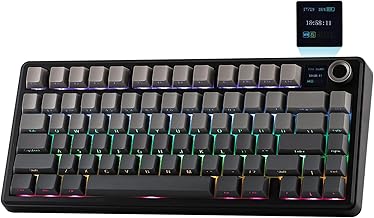
80 programmable keys, GIF-capable TFT screen and volume knob, hot‑swappable switches, gasket-mounted comfort and creamy, tuned typing – great for gaming & work.
$74.69 on Amazon
View on AmazonPrice and availability are accurate as of 01/28/2026 11:53 pm GMT and are subject to change.
Prefer classic click? This C2 variant keeps the macOS niceties—a proper Command/Option arrangement, the full function row, and USB‑C wired stability—while delivering crisp, clicky feedback that many typists still swear by. Media control remains at your fingertips via the F‑row, and macOS shortcuts map as expected with the hardware Mac/Win switch.
It’s a straightforward recommendation if you want a no‑nonsense “wired keyboard for MacBook with function keys” and you value tactile sound. The obvious trade‑offs: no hot‑swaps on this model, and clickies are not the most considerate choice in open offices. If you can control the noise, the typing confidence is excellent.
3. Keychron K2 V2 — Compact 75% Mac layout with wireless plus USB‑C

Price and availability are accurate as of 12/26/2025 02:15 pm GMT and are subject to change.
The K2 V2 earns its reputation as the do‑it‑all Mac‑friendly compact. You get a real F1–F12 row, arrow keys, and proper Command/Option positions in a footprint that still fits a mobile setup. It pairs to multiple devices over Bluetooth, then shifts to low‑latency USB‑C when you need maximum responsiveness. The optional aluminum‑frame trim (on certain configurations) complements Apple’s design language without resorting to RGB excess.
For designers and writers who value desk space yet refuse to give up the F‑row, the K2 V2 is the sweet spot. Expect a short learning curve with the tighter 75% layout and plan on wired USB‑C for latency‑sensitive work. Once settled, it’s a terrific “Mac layout mechanical keyboard” that travels well and still feels substantial.
4. YUNZII B87 (Pink Milk V2) — TKL gasket comfort with QMK/VIA for macOS power users

Hot-swappable full-size keyboard with per-key RGB, Mac/Windows keycaps, tactile Gateron Browns and USB-C braided cable—swap switches and customize typing, no soldering.
$68.79 on Amazon
View on AmazonPrice and availability are accurate as of 01/28/2026 11:55 pm GMT and are subject to change.
If you want the comfort of a gasket‑mounted deck and the power to fine‑tune every key for macOS, the B87 is compelling. The tenkeyless layout preserves the F1–F12 row for media and system controls while freeing mouse space compared with full‑size boards. Hot‑swappable sockets make it simple to try different switches, and QMK/VIA support lets you craft per‑app macOS layers—think Final Cut, Logic, or Xcode—without sacrificing plug‑and‑play basics.
This is a strong pick for developers and creators who value a softer typing experience and want headroom for future tinkering. Just know the case leans playful rather than austere, and the best features (firmware tweaks) reward users willing to explore VIA.
5. EPOMAKER x Aula F75 MAX — 75% with knob and TFT for creative workflows

Price and availability are accurate as of 12/26/2025 02:15 pm GMT and are subject to change.
The F75 MAX brings a creator‑friendly twist to a Mac‑native 75% layout: a dedicated knob that’s perfect for scrubbing timelines, controlling volume, or zooming canvases. You keep the F‑row for media and shortcuts, plus true Command/Option placement for muscle memory. With hot‑swappable sockets, you can experiment with switch feel as your preferences evolve, and you can connect via USB‑C for stable, low‑latency sessions on your MacBook or iMac.
The small TFT screen is fun but far from essential; the real value is the compact form factor that doesn’t compromise the function row. Expect to do a bit of setup (keymaps, profiles) to get the most from it. Once dialed in, it’s a versatile, Mac‑forward board for creative pros.
6. Redragon K686 PRO — Compact 98% Mac layout with numpad and media knob

Compact 75% aluminum mechanical keyboard: RGB, Gateron red switches, switch among 3 Bluetooth devices, Mac/Windows keycaps, 4000mAh battery—great for home, office & gaming.
$0.00 on Amazon
View on AmazonPrice and availability are accurate as of 01/28/2026 11:56 pm GMT and are subject to change.
For power users who need a numpad but dislike the sprawl of a full‑size, this compact 98% layout is ideal. You get a dedicated F‑row for media and shortcuts, arrow keys, and a numpad—plus a hardware knob for instant volume control. The gasket structure brings a softer, more refined sound than typical “gaming” boards, and USB‑C wired mode ensures reliable performance on macOS when responsiveness matters.
While the aesthetic skews flashier than a Keychron, the functional story is strong for Mac users: proper modifier behavior, media keys on the F‑row, and a footprint that balances productivity and space. For spreadsheet jockeys and finance pros, it’s a smart compromise.
FAQ
How do I ensure the function row controls media on macOS?
- In macOS System Settings > Keyboard, enable “Use F1, F2, etc. keys as standard function keys” based on your preference. Most boards above implement media on the Fn layer (e.g., Fn+F10 for mute). With VIA/QMK boards, you can map media directly to F‑keys if you prefer single‑press control.
Will these keyboards work with Apple silicon (M1/M2/M3) Macs?
- Yes. USB‑C wired and Bluetooth profiles function normally on Apple silicon. If a vendor utility app is Windows‑only, you can still use onboard shortcuts or VIA/QMK (when supported) to configure keys on macOS.
Do I need special drivers for macOS?
- No drivers are required for basic typing, media keys, and the macOS layout. Some advanced features (per‑key lighting, TFT widgets) may use optional software. VIA runs in the browser or as a macOS app for supported keyboards.
USB‑C vs. USB‑A: which should I choose for a MacBook?
- Prefer USB‑C for simplicity and reliability. It plugs directly into MacBooks and modern docks, reduces adapter clutter, and tends to provide cleaner cable management to a display or hub. If your cable is USB‑A on one end, a compact C‑to‑A adapter works in a pinch.
What switch type is best for shared offices?
- Tactile or light linear switches are the safest choices. They keep noise down compared with clicky switches, and with a gasket‑mounted board or basic foam, you’ll further reduce sound without losing feel.
The Mac‑Mech Sweet Spot: Final Picks and Who They’re For
- Best wired full‑size for Mac: Keychron C2 (Hot‑Swappable). Native macOS layout, full F‑row, and numpad; easy to maintain and perfect for all‑day office work over USB‑C.
- Best clicky full‑size: Keychron C2 (G Pro Blue). Same macOS convenience with a typist‑pleasing click—great if you can control noise.
- Best compact wireless with F‑row: Keychron K2 V2. A 75% “Mac layout mechanical keyboard” that travels well and still offers F‑keys, arrows, and Bluetooth with a USB‑C fallback.
- Best TKL for comfort and customization: YUNZII B87 (Pink Milk V2). Gasket mount, hot‑swaps, and VIA/QMK for power users who want granular macOS layers.
- Best 75% for creative control: EPOMAKER x Aula F75 MAX. A Mac‑native F‑row plus a knob to accelerate media and design tasks.
- Best space‑saving numpad board: Redragon K686 PRO. The 98% layout keeps F‑keys and a numpad without sprawling, with a handy volume knob for day‑to‑day control.
No matter which you choose, prioritize a true macOS layout, a dedicated function row, and USB‑C. Those three elements are the difference between “it works” and “it feels like it was built for a Mac.”








Leave a Comment