

The Best Low-Profile-Friendly 65% (and Compact) Hot‑Swappable Wireless Mechanical Keyboards
Raise your laptop onto a stand and a new problem appears: many mechanical keyboards are tall, deep, and clack loud enough to echo through meetings. The sweet spot for a mobile‑friendly setup is a compact board with a slimmer front height, reliable wireless, and hot‑swappable switches so you can tune sound and feel without buying a new deck. Below, I’ve rounded up compact 65–75% keyboards (plus one compact 98% for number‑crunchers) that prioritize wireless performance, switch flexibility, and cross‑platform use—while staying friendly to laptop‑stand ergonomics.
Why this category matters on a laptop stand
A laptop stand changes how you type and navigate. With the screen raised, your keyboard sits closer to the stand’s base and often under the lip of the laptop itself. A compact layout with a smaller footprint helps prevent collisions with the stand, keeps your pointing device in a comfortable zone, and reclaims desk space in tight environments.
“Low profile” can mean two things: physically low‑profile switches (like Kailh Choc), or a lower‑slung case with a reduced front height that feels easier on the wrists. The models below use mainstream MX‑style switches for broad hot‑swap compatibility, but they emphasize slimmer cases, compact layouts, and better typing angles—practical advantages that make them friendlier than bulky high‑profile customs in a laptop‑stand workflow.
If you frequently move between rooms or coworking spaces, compact wireless boards also pack easier and avoid cable clutter. Add multi‑device switching and you can bounce from laptop to tablet to phone in seconds.
Wireless that behaves like wired
The wireless stack matters as much as layout. Bluetooth is great for battery life and quick device hopping, especially across macOS, Windows, iPadOS, and Android. For gaming or live audio work, a 2.4 GHz USB receiver can deliver lower latency and fewer dropped inputs than Bluetooth in noisy RF environments. Tri‑mode boards (Bluetooth/2.4G/USB‑C) offer the best of all worlds: a dongle for demanding sessions, Bluetooth for convenience, and a cable for firmware or zero‑latency scenarios.
Battery capacity, sleep behavior, and LED control are the other big variables. Larger batteries (4,000–7,500 mAh) extend runtime, especially with RGB off or dimmed. South‑facing LEDs can look brilliant without washing out legends—just note that brighter effects drain faster. The picks here balance endurance with modern lighting so you choose the trade‑off that fits your day.
Hot‑swappable switches: your ergonomic safety valve
Hot‑swap sockets let you change switches without soldering. That’s not just for tinkering; it’s a practical path to better ergonomics. If your fingers or wrists feel strained on heavier springs, drop in light linears. Need tactile feedback for accuracy? Tactiles are a five‑minute swap. Prefer a quieter space? Pre‑lubed linears with sound‑dampened cases tame noise in open offices.
All boards below use MX‑style hot‑swap sockets that accept both 3‑pin and 5‑pin switches, giving you a broad switch library. Several include gasket structures, silicone or poron foams, and pre‑lubed stabilizers—features that reduce case ping and deliver a quieter, “creamy” sound signature well‑suited for shared environments.
How to shop this niche (and avoid the gotchas)
- Layout and footprint: 65% retains arrows and navigation; 68–75% adds a few keys or a function row; 98% keeps a numpad in a tighter footprint. For laptop stands, the 65–68% zone offers the easiest fit.
- Front height and angle: A lower front height (and adjustable feet) feels more “low‑profile” in practice. If you’re sensitive to wrist angle, a slim wrist rest helps.
- Multi‑device and OS switching: Look for simple, labeled toggles for Windows/Mac layers and quick FN‑key switching across 3–5 devices.
- Tri‑mode wireless: 2.4 GHz plus Bluetooth gives you both low latency and platform flexibility.
- Hot‑swap compatibility: Sockets that support 3‑pin and 5‑pin MX‑style switches maximize your options.
- Sound and feel: Gasket mounts, silicone/poron foam, and pre‑lubed stabs deliver a more refined, office‑friendly tone.
- Software: Some vendors offer Windows‑first software. If you’re on Mac, confirm macOS layer toggles and whether key remapping is browser‑based or Mac‑native.
- Lighting and keycaps: South‑facing RGB is great for shine‑through sets; PBT keycaps resist shine. Clear/ABS caps can look stunning yet may show fingerprints or wear sooner.
- Weight and portability: Silicone and polycarbonate can add density; if you carry daily, note weight and whether the board includes a cable or case.
Selection criteria for this roundup:
- Compact 65–75% first, with one compact 98% for users who need a numpad
- Wireless prioritized (tri‑mode when available), plus hot‑swappable MX support
- Mac/Windows compatibility and straightforward multi‑device switching
- Lower‑slung, laptop‑stand‑friendly ergonomics compared to bulkier high‑profile customs
- Solid acoustics out of the box, with room to customize
1. YUNZII C68 — Best overall 65% for wireless, hot‑swap, and laptop‑stand ergonomics
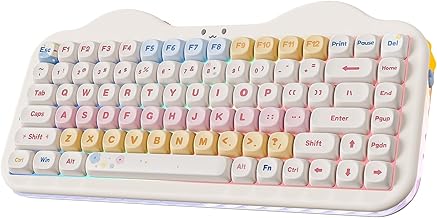
Cute cake-themed 75% mechanical keyboard with creamy thocky feel, hot-swappable switches, tri-mode wireless for 5 devices, programmable RGB and big 5500mAh battery.
$74.71 on Amazon
View on AmazonPrice and availability are accurate as of 01/28/2026 10:21 pm GMT and are subject to change.
The C68 nails the core brief: a 65% layout that fits neatly under most laptop stands, reliable tri‑mode wireless, and genuine hot‑swappable flexibility. Its silicone‑damped construction and pre‑lubed switches result in subdued, office‑friendly sound—ideal for shared spaces or late‑night sessions. The compact footprint leaves room for your mouse without your palm scraping the stand’s riser.
Beyond the cute exterior, the essentials are here: multi‑device pairing (up to four), a 4,000 mAh battery for reasonable endurance, and south‑facing RGB that stays visible without flaring into your eyes. If you’re on Mac, the macOS layer keeps common shortcuts where you expect them. If you tinker, the PCB’s support for both 3‑pin and 5‑pin switches opens a vast switch library to fine‑tune feel and sound.
2. YUNZII X71 — Best 68% tri‑mode for visibility and a refined, quiet “gasket” feel
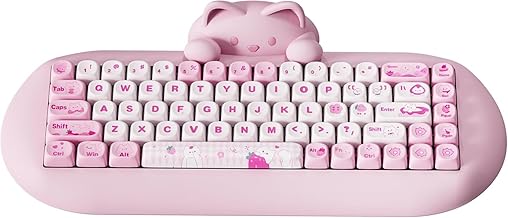
Adorable cat-head 65% mechanical keyboard: silky silicone, quiet pre-lubed switches, hot-swappable keys, tri-mode wireless + long battery, compact, comfy, and customizable.
$72.79 on Amazon
View on AmazonPrice and availability are accurate as of 01/28/2026 10:22 pm GMT and are subject to change.
If you want striking looks without sacrificing practicality, the X71 blends a transparent aesthetic with a genuinely damped, low‑noise typing experience. The 68‑key layout is effectively a 65% with a couple of extras, keeping arrows and essentials while remaining stand‑friendly. A dedicated Mac/Windows switch and tri‑mode connectivity make it easy to jump between a laptop, tablet, and phone.
Under the hood, a gasket mount with poron and PET layers absorbs vibrations, so you hear more of the switch tone and less of the case. TTC hot‑swap sockets add durability and reliable contact, while south‑facing LEDs illuminate those double‑layer clear caps evenly. It’s a showpiece that still respects ergonomics, portability, and cross‑platform workflows.
3. YUNZII C75 — Best compact 75% for function‑row power users on the go

Compact 68-key wired keyboard with true hot-swap (3/5‑pin), quiet linear reds, vivid RGB, and a space-saving gamer layout—easy mods and smoother FPS play.
$39.99 on Amazon
View on AmazonPrice and availability are accurate as of 01/28/2026 10:22 pm GMT and are subject to change.
Need a function row and dedicated navigation without going tenkeyless? The C75 squeezes full‑time F‑keys into a compact shell that’s surprisingly manageable next to a laptop stand. Its tri‑mode stack supports up to five devices, and the battery capacity helps offset the power draw from RGB and 2.4G sessions.
The gasket build and silicone dampening damp down hollowness and stabilizer rattle for a rich, “creamy” tone that’s comfortable in meetings and late‑night edits. Because it’s genuinely hot‑swappable, you can install quieter linears for calls or snappier tactiles for editing—no soldering needed. If your workflow leans heavily on shortcuts and functions but you still want a portable footprint, this is a smart middle ground.
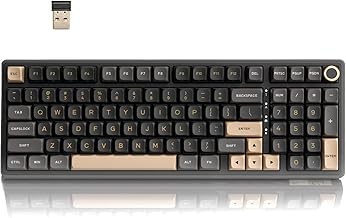
4. RK Royal Kludge R98 Pro — Best “single board” solution if you need a numpad

Compact 65% with arrows, satisfying thocky typing and retro translucent look, hot‑swappable switches and RGB—easy to customize for your perfect setup.
$99.95 on Amazon
View on AmazonPrice and availability are accurate as of 01/28/2026 10:23 pm GMT and are subject to change.
Sometimes you truly need a numpad. The R98 Pro delivers full productivity in a tighter chassis than a standard full‑size, so you can keep a single board for spreadsheets, code, and games. Its tri‑mode stack (Bluetooth/2.4G/USB‑C) plus a huge battery makes it a dependable all‑day wireless companion, and the south‑facing LEDs keep backlighting vibrant without harsh hotspots.
Despite the larger key count, the typing experience is anything but hollow: a gasket‑influenced structure, multiple soft layers, and pre‑lubed switches aim for a damped, “creamy” sound profile. It’s not the smallest option here, but if swapping between compact and full‑size breaks your flow, the R98 Pro lets you park one keyboard under the stand and do everything.
5. Higround Basecamp 65% — Best wired 65% for a rich “thock” and retro‑clear style
Compact 98% mechanical keyboard with 3-mode wireless, 365-hr battery, gasket softness, hot-swappable pre-lubed switches, ready to customize?
$79.99 on Amazon
View on AmazonPrice and availability are accurate as of 01/28/2026 10:23 pm GMT and are subject to change.
If you don’t need wireless—and want a compact board with a confident, deep “thock”—the Basecamp is a stylish 65% that plays well in small desk footprints. The translucent polycarbonate frame nods to classic consoles while the internal dampening calms resonance. Result: a refined acoustic character that feels more like a custom than an entry‑level tray mount.
Hot‑swappable sockets make it easy to switch from stock to your favorite tactile or linear set. RGB, macros, and included pullers round out an out‑of‑the‑box toolkit for personalizing feel and look. It’s a cable‑only option that earns its place on the list for creators who value stable latency and acoustic polish over multi‑device hopping.
6. Redragon K631 — Best budget hot‑swap 65% for wired minimalists

Crystal-clear RGB 68% keyboard: hot-swappable, tri-mode wireless, long battery, gasket-mounted for quiet, switchable Mac/Win—great for gaming and daily typing.
$99.99 on Amazon
View on AmazonPrice and availability are accurate as of 01/28/2026 10:24 pm GMT and are subject to change.
For a cost‑conscious way into hot‑swappable 65%, the K631 checks a lot of boxes. It’s compact, includes dedicated arrows, and uses a true hot‑swap PCB, so you can install nearly any MX‑style switch without fuss. That makes it an excellent learning platform: try quieter linears for calls or a light tactile for precise keying—no soldering irons required.
While wired, the 68‑key layout saves desk space and avoids cable collisions with a laptop stand. RGB is easily managed on‑board, or you can use software to dial in macros and layers on Windows. It’s not the most refined acoustic package out of the box, but it’s endlessly tinkerable and beginner‑friendly.
FAQ
- Are these “low‑profile” keyboards in the switch sense?
- No. These models use standard MX‑style switches for broad hot‑swap compatibility. They’re “low‑profile‑friendly” because their compact layouts, lower‑slung cases, and adjustable angles work better with laptop stands than tall, bulky customs. If you need true low‑profile (short‑travel) switches, look for Choc‑compatible boards—but those rarely support mainstream MX hot‑swap.
- Bluetooth or 2.4 GHz—what should I choose?
- Use Bluetooth for battery life, device hopping, and compatibility with phones/tablets. Use 2.4 GHz when latency matters (competitive games, live audio) or in congested environments with lots of Bluetooth devices. Tri‑mode boards let you pick the best mode per task.
- Will these work on both Mac and Windows?
- Yes. All the wireless picks provide Mac/Windows support; several include a physical OS toggle. Software for deep customization is often Windows‑first, but basic remaps, layers, and lighting can usually be set on Windows and then used on macOS. The RK R98 Pro even offers online configuration for both.
- How do I make a standard‑height mechanical feel more “low profile”?
- Try a slim wrist rest to flatten your wrist angle, adjust the keyboard feet for a lower slope, and consider shorter keycap profiles (e.g., Cherry profile) for a small but noticeable drop in overall height. Switch to lighter‑spring linears if finger fatigue is an issue.
- Any tips to fit a keyboard under a shallow laptop stand?
- Favor 65–68% layouts, push the keyboard slightly forward so the stand’s lip clears the top row, and use a short, low‑profile USB receiver for 2.4G (if needed). If the stand sits very low, dial back the keyboard’s rear feet to reduce overall height.
The Shortlist, Matched to Real‑World Setups
- Best all‑around 65% wireless hot‑swap: YUNZII C68 — balanced acoustics, tri‑mode convenience, and a compact footprint that plays nicely with stands.
- Best quiet 68% with showpiece looks: YUNZII X71 — gasket‑smooth feel, bright yet tasteful RGB, and fast switching across devices.
- Best for function‑row power users: YUNZII C75 — a compact 75% that still fits the stand‑friendly brief.
- Best if you need a numpad: RK Royal Kludge R98 Pro — all the keys with tri‑mode wireless and a long‑haul battery.
- Best wired acoustic package: Higround Basecamp 65% — rich “thock,” translucent style, and hot‑swap flexibility.
- Best budget hot‑swap 65%: Redragon K631 — affordable, mod‑ready, and compact.
When you’re working from a laptop on a stand, the right keyboard is the difference between constant adjustments and a flow state. Prioritize a compact layout, dependable tri‑mode wireless, and MX hot‑swap to tailor the experience to your hands and your space. Start with the C68 or X71 if you want the most stand‑friendly balance; step up to the C75 or R98 Pro if your workflow demands more keys; choose the Basecamp or K631 if you prefer the certainty of a cable. Either way, you’ll get a clean desk, a calmer sound, and typing that suits you—not the other way around.








Leave a Comment