

The 4 Best LED Desk Lamps and Monitor Light Bars for Eye Comfort and Focus
If you work from home, your lighting is either quietly supporting deep focus—or slowly draining your eyes. A well-chosen LED desk lamp or monitor light bar can cut glare, balance contrast with your screen, and keep colors true so you can edit, code, or read longer with less strain. The trick is picking a light that suits your setup and how you actually work.
Below, I unpack what matters in eye‑care lighting, how to shop with confidence, and six standout picks—ranging from full‑span clamp lamps to premium monitor bars—that balance adjustable color temperature, granular dimming, and careful optics.
Why Eye‑Care Lighting Matters More Than You Think
Screen time skews the visual balance in your workspace. Your monitor is bright, contrasty, and static, while the rest of the room is comparatively dark and dynamic. That mismatch forces constant pupil adjustments, which can trigger fatigue, headaches, and dry eyes. Good task lighting raises ambient light around the screen, reducing the “spotlight” effect and smoothing contrast.
It’s not just brightness. Glare control and uniformity are just as important. Asymmetrical optics that push light away from your display and toward your desk surface reduce screen reflections and improve readability on paper. A wide bar or well‑designed arm can flood the full width of your keyboard and notes evenly, so your eyes aren’t jumping between hot spots and shadows.
Finally, flicker matters. Many LEDs dim using PWM (pulse-width modulation). If the frequency is too low, some people perceive micro‑flicker that contributes to fatigue. Look for eye‑care positioning and, if available, flicker‑free claims or high PWM frequencies. Constant‑current drivers and quality diffusers also help maintain stable, comfortable light.
Common Use Cases (and the Right Form Factor for Each)
- Dual‑monitor and ultrawide setups: You need width and uniformity. A long clamp lamp or a monitor light bar designed for curved and wide screens will distribute light evenly across your entire work zone. The aim is a broad, shadow‑free pool of light without bouncing glare into your display.
- Content creation and color‑sensitive work: Adjustable color temperature is non‑negotiable. Warmth helps for reading; cooler temps keep whites crisp for editing. High color fidelity (seek 90+ CRI when available) keeps skin tones and product colors accurate. A lamp with precise dimming steps makes it easier to match room light.
- Compact or minimalist desks: A monitor light bar is hard to beat for zero footprint and tidy cable routing. It uses your monitor as the mount, illuminates the desk evenly, and leaves your surface clear for a laptop, tablet, or sketchbook.
- Hands‑busy workflows: If you often jump between soldering, sketching, or typing, gesture controls or a dedicated remote can be a pro‑level convenience. Being able to nudge brightness or color temp without breaking flow is underrated but meaningful.
How to Shop: Features That Actually Reduce Eye Fatigue
Start with adjustability. You want stepless or multi‑step brightness and a useful color temperature range (from warm for late nights to cooler for daytime clarity). This lets you match lighting to the time of day and the task at hand, supporting circadian rhythms and reducing harsh contrast.
Check beam pattern and glare control. Asymmetrical or anti‑glare designs that cast light forward and downward—without reflecting off your screen—are essential. On desks with glossy displays, this is the difference between comfort and constant squinting.
Evaluate build quality and ergonomics. Metal swing arms lock positioning reliably; clamp bars save space and illuminate broadly. Controls matter too: tactile dials, remotes, and gestures each suit different workflows. For ultrawides and curved displays, verify compatibility so the light sits stable and distributes evenly.
Color fidelity (CRI) is a key differentiator if you do design, photo, or video work. When CRI isn’t specified, consider reaching out to the brand or selecting models known for color‑accurate optics. Eye‑care language often implies flicker mitigation and uniform diffusion, but confirm details if you’re sensitive.
Our Selection Criteria
- Eye comfort: glare control, uniform light, and eye‑care design with flicker‑minimizing drivers where advertised.
- Adjustability: granular brightness control and multiple color temperatures for day/night work.
- Beam width and uniformity: sufficient reach for single, dual‑monitor, and ultrawide setups without hot spots.
- CRI and color quality: preference for lights that preserve natural color; note when CRI is unspecified.
- Controls and usability: remote, motion, or gesture options plus intuitive on‑device controls.
- Build and aesthetics: stable mounts, clean lines, and materials that suit a professional workspace.
- Compatibility: mounts that work with curved monitors, thick bezels, or various desk edges.
- Value: strong feature‑to‑cost balance and a track record of reliable performance.
1. Eye-Care LED Clamp Lamp for Dual Monitors — 24W, 5-Color Adjustable Light

Price and availability are accurate as of 12/20/2025 03:15 pm GMT and are subject to change.
A strong pick for multi‑monitor workstations, this 24W clamp lamp emphasizes width and uniform coverage. The long bar pools light across your keyboard, notes, and peripherals without dumping reflections back into your displays—a must if you’re coding on one screen while referencing docs on another. The clamp mount frees up precious surface space, and the slimline look suits modern setups.
Five color temperature options make it easy to warm the light for late‑night reading or cool it for crisp daytime focus. Dimming lets you set a comfortable baseline against your screen brightness to reduce eye strain. For color‑critical tasks, note that CRI isn’t specified; for most office work, this won’t be an issue, but creatives may want to verify.
2. Quntis Monitor Light Bar — Eye-Care No‑Glare LED with Remote for Curved Monitors
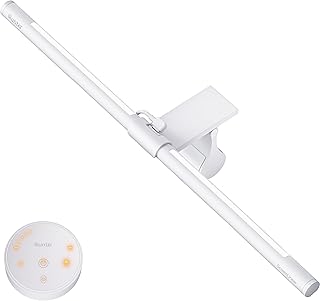
Thin monitor light bar with front+back glow to cut glare, true-color LEDs, clip-on for any screen, and a handy remote for smooth dimming and eye comfort.
$49.99 on Amazon
View on AmazonPrice and availability are accurate as of 01/28/2026 11:07 pm GMT and are subject to change.
If a clean, minimal desk is your priority, a monitor light bar is the most elegant solution. This Quntis model mounts directly to your monitor—curved or flat—so the light falls on your workspace while deliberately skipping the screen. That asymmetrical beam is a cornerstone of eye‑care design: you get a brighter desk and reduced contrast with zero reflections on‑screen.
The included remote earns real points for usability. Dial in brightness and color warmth without reaching over your monitor. For video calls, a slightly cooler setting can make documents pop; warm, dimmed light can shift the mood for evening reading. The compact form keeps your desk open, though the beam is task‑oriented rather than ambient, so consider a secondary room light if you want broader fill.
3. BenQ ScreenBar Pro LED Monitor Light — Motion-Sensing USB-C Eye-Care Lighting for Ultrawide & Curved Monitors

Bright, glare-free monitor light with motion sensor and wide, adjustable beam. Clamps to most screens, saves desk space, USB-C powered—perfect for focused, comfy work.
$139.00 on Amazon
View on AmazonPrice and availability are accurate as of 01/28/2026 11:05 pm GMT and are subject to change.
BenQ’s ScreenBar line is the reference point for monitor‑mounted task lighting, and the Pro model is tailored for wide and curved panels. It delivers uniform, anti‑glare illumination across your workspace without reflecting into the display, letting your eyes relax into a balanced scene. USB‑C power simplifies cabling, and motion sensing means the light is just “on” when you are—an understated but meaningful quality‑of‑life touch.
The design language is clean and unmistakably professional. If you’re already invested in an ultrawide monitor for timeline editing or multitasking, pairing it with an optical system built for that geometry makes sense. Just note the monitor‑bar tradeoff: you’ll get precise task lighting, not the diffuse fill of a room lamp. Webcam placement may need a rejig on some bezels.
4. Eye-Caring LED Desk Lamp — Metal Swing Arm, 3 Color Temps & 10 Brightness Levels

Price and availability are accurate as of 12/20/2025 03:15 pm GMT and are subject to change.
A traditional architect lamp still has advantages. The metal swing arm lets you put light exactly where you need it—tight to the page for sketching or high and wide for keyboard coverage. Ten brightness levels across three color temperatures make it straightforward to tune ambience quickly, and the rigid arm keeps that aim locked in once set.
The form factor works well if you alternate between screen time and tactile tasks where you want light from a specific angle to reduce hand shadows. Compared with long bar lights, coverage is more localized, so placement is everything for glare avoidance. If you don’t need a sprawling beam and prefer a classic look with strong ergonomics, this is a solid, eye‑care‑oriented pick.
FAQ
- What’s the difference between a monitor light bar and a traditional desk lamp?
- A monitor light bar mounts on your display and uses asymmetrical optics to light the desk while avoiding screen reflections. It has a tiny footprint and is ideal for minimalist setups. A desk lamp provides a broader or more directional pool and can be positioned anywhere, which is better for large surfaces, crafting, or drafting.
- How important is CRI for work-from-home lighting?
- For general office work, a typical LED’s color rendering is adequate. For design, photography, or anything color‑critical, a high CRI (90+) helps keep colors natural and skin tones accurate. If CRI isn’t listed, consider contacting the brand or selecting models known for high fidelity.
- How bright should my task light be?
- For most desks, 500–1000 lumens of well‑aimed, uniform light is comfortable when paired with your monitor brightness. Larger work surfaces or craft tables benefit from higher output (e.g., 1500+ lumens) and wider beams to avoid shadows. Brightness control is key; you need headroom and the ability to dim.
- What about flicker—should I be concerned?
- Many eye‑care lamps use drivers and diffusion to minimize perceptible flicker, especially at mid to high brightness. If you’re sensitive, look for flicker‑free claims or high PWM frequencies. Avoid running LEDs at the very lowest dimming levels if you notice discomfort.
- How do I avoid glare on glossy screens?
- Use asymmetrical lighting that throws light forward onto your desk, not onto the display. Position lamps higher and slightly forward of the screen’s front plane. With swing‑arm lamps, angle the head so the beam terminates on the work surface. With bars, choose models designed to avoid screen reflection and fine‑tune tilt.
Light Smarter, Work Easier: Final Recommendations
Picking the right lamp is less about raw brightness and more about control, beam shape, and how the light integrates with your setup.
- Best for dual‑monitor workstations: Eye‑Care LED Clamp Lamp for Dual Monitors. Wide, uniform coverage with 5 CCT modes makes long coding or research sessions easier on your eyes.
- Best minimalist upgrade for curved and ultrawide displays: BenQ ScreenBar Pro. Premium optics, motion sensing, and USB‑C power make it a set‑and‑forget companion.
- Best value monitor bar with remote: Quntis Monitor Light Bar. No‑glare desk lighting, curved‑monitor compatibility, and a handy remote in a compact package.
- Best for large desks and mixed workflows: ONEMIX 42″ Clamp LED Desk Lamp. Four adjustable segments and high output tame sprawling work surfaces.
- Best hands‑free control: 31.5″ Gesture‑Control Dimmable LED Desk Lamp. Wave to adjust brightness and warmth without breaking flow.
- Best classic swing‑arm choice: Eye‑Caring LED Desk Lamp with Metal Swing Arm. Precise positioning and simple controls for reading, drafting, and everyday tasks.
If you’re sensitive to flicker or need color‑accurate lighting, confirm CRI and driver details before purchasing. Otherwise, prioritize adjustability, glare control, and the form factor that best matches your screen setup. Your eyes—and your focus—will thank you.








Leave a Comment