

The Best MMO Keyboards and Macro Pads for WoW, FFXIV, and Strategy Players
If you’ve ever wiped in a raid because you fat-fingered a cooldown, you already understand the power of a good macro. In MMOs and strategy titles, shaving seconds off target swaps, burst windows, or build orders adds up—and dedicated macro keys make those actions feel effortless. The picks below dial into what MMO players actually need: predictable macros, quick profile switching, and software that doesn’t make you fight the UI mid-raid.
Why macro keys matter in MMOs and strategy games
World of Warcraft and Final Fantasy XIV are hotkey-heavy. Between core rotations, utility abilities, markers, target macros, and consumables, your left hand works overtime. Dedicated macro keys (or a separate macro pad) let you move complex sequences off your main cluster, so core movement and combat keys stay uncluttered.
Strategy games benefit just as much. Think layered build orders in StarCraft, camera location anchors in RTS/4X titles, or civilized hotbar orchestration in CRPGs. Macro keys turn repetitive, precision-demanding actions into single, repeatable presses—less mental bookkeeping, more clean execution.
Beyond speed, macros aid consistency. Recording sequences and binding them to stable keys reduces on-the-fly errors. And with profiles, you can swap from raid to Mythic+ (or dungeon to crafting) in seconds without relearning anything.
Keyboard vs. macro pad: which setup fits your playstyle?
Two routes dominate: a gaming keyboard with dedicated macro keys, or a standalone macro pad that sits on your left. Keyboards with side macro columns keep everything unified—one cable, one device. They often add media controls and a volume wheel too. The trade-off: limited count (usually 5–6 keys) and less visual labeling unless software overlays help.
Macro pads explode your macro real estate. A 15-key pad with screens lets you create labeled, color/icon-coded pages—perfect for class sets, job roles, or specific boss encounters. A dial for volume or timeline scrubbing doubles for content creators who also stream or edit. You’ll manage two devices, but the clarity and expansion potential are enormous.
If you stream, macro pads shine with OBS scene switching, push-to-talk, and chat tools alongside your game binds. If you prefer one compact board, pick a keyboard with on-the-fly macro recording and a few dedicated keys.
Software, profiles, and RGB: the QoL that actually matters
Software makes or breaks macro gear. You want:
- Fast assignment: record or map a macro in seconds, name it clearly, and drop it onto a key.
- Profile switching: ideally, one key cycles between profiles (e.g., raid/healer/crafting), and profiles can autoload per game.
- Clear labeling: icons and color-coding help your brain find “Battle Shout” versus “Bloodlust” at 2 a.m.
- Reliable playback: consistent timing and full key-up/down control matter for long combos or chat text.
Onboard memory is valuable if you swap PCs or don’t want background apps running. Some devices offer on-the-fly recording that sticks on the device; others keep assignments in software. Neither is “wrong”—just know your preference.
RGB is more than flair, too. Per-key lighting can color-code rotations, cooldown windows, or roles. Side lighting provides ambient cues (e.g., red = burst phase). If you raid in the dark, it’s also just practical.
Selection criteria we used
- Number of dedicated macro keys or programmable capacity per layer
- Ease of software use and speed of recording/assignment
- Onboard storage vs. software dependency for profiles
- Profile switching (how quickly and clearly you can swap)
- Switch feel (linear vs. clicky), hot‑swap support, and acoustic tuning
- Layout (compact vs. full, numpad presence, dedicated media/volume controls)
- RGB flexibility and per-key/zone customization
- Connectivity (wired vs. tri‑mode) and battery life for wireless options
- Build quality (keycaps, frame, stability) and ergonomics (wrist rest, height)
1. Redragon K580 VATA — 5 Dedicated Macros, Hot‑Swap Switches, and a Tactile Volume/Backlight Wheel

Left-handed macro keypad: 15 customizable LCD keys, shortcut/calculator/numeric modes, big dial and Action Flow—speed up editing, streaming and daily workflows.
$64.99 on Amazon
If you want a true MMO mechanical keyboard with dedicated macro keys, the K580 VATA hits the sweet spot. The left-side G1–G5 keys are easy to reach for rotational abilities, target focuses, or raid markers, and you can record macros on the fly—no extra software required. That’s huge when you’re mid-session and realize you need a new macro for a particular boss mechanic. The volume/backlight wheel and media keys add daily quality-of-life; adjust comms and music without tabbing out.
Hot‑swappable sockets (3/5‑pin) mean you can fine-tune switch feel for raiding or typing, and RGB is flexible enough to color-code key groups (e.g., cooldowns in purple, defensives in blue). It’s a full-size board, so you keep your numpad for crafting and spreadsheets, but you’ll need adequate desk space. If you’re building a clean, dedicated MMO battlestation with a few reliable macros and streamlined controls, this is a practical, well-rounded pick.
2. Redragon K512 Shiva — 6 Onboard Macros, Magnetic Wrist Rest, and Full RGB

Silent, creamy keystrokes with hot-swappable switches, tri-mode wireless for 3 devices, compact 98% layout and programmable QMK/VIA, perfect for work or play.
$64.99 on Amazon
For MMO players who want more dedicated keys without juggling software, the K512 Shiva is a sleeper favorite. You get six macro keys for class-specific setups—tank cooldowns, healer triage macros, DPS burst sequences—and you can record them quickly on the board. The included wrist rest matters during long raids or crafting sessions, and dedicated media keys keep distractions low. It’s a durable board with double-shot keycaps and reliable anti-ghosting across high-traffic zones.
While its “mechanical‑feel” switches aren’t true mechanicals, they’re consistent and quiet—great if you share a space. The software enables deeper lighting and macro configuration, but the on-the-fly support is the star for MMO players who constantly tweak binds. If your priority is comfortable marathon sessions with plenty of dedicated macros at your fingertips, this is a budget-friendly powerhouse.
3. N1 Macro Pad (Black) — 15 Customizable LCD Keys, Dial, and Three Modes for Game/Stream/Work

Compact TKL mechanical keyboard frees desk space, clicky blue switches for precise typing, hot‑swappable 3‑pin, 18 RGB modes, metal frame and PBT caps.
$29.99 on Amazon
Think of the N1 Macro Pad as an MMO command center for your left hand. You get 15 LCD keys, each assignable to single actions or elaborate sequences, and each key can display a custom icon or animation. That visual labeling is gold during raids when you need instant recognition—burst, battle rez, target markers, job stances—no second-guessing. The “Action Flow” feature executes multiple steps in a specific order, handy for multi-stage in-game routines or intricate stream scenes.
Beyond games, the N1’s dial handles volume or brightness, and mode switching lets it double as a numpad or calculator—a clever way to earn desktop real estate. It integrates with OBS, Adobe apps, and more, which is perfect if you stream MMOs or edit highlights. Just note that it’s an add-on device and relies on its software to run your assignments. If you crave more macro capacity than any keyboard provides, this pad is your clean, customizable answer.
4. Redragon K742 — QMK/VIA Programmability, Tri‑Mode Wireless, and a Compact 98% Layout with Knob

Hot-swap switches, 5 on-the-fly macro keys, multimedia + volume/backlight wheel, durable double-shot keycaps, customizable RGB – build a stylish, gamer-ready keyboard.
$59.99 on Amazon
If you like the idea of unlimited macro potential and clean desk aesthetics, the K742 is compelling. With QMK/VIA support, you can map macros to layers, create tap/hold behaviors, and build a multi-profile setup that follows you across devices. Tri‑mode connectivity lets you switch between your PC, laptop, and tablet with a button press—handy if you run Discord or stream control from a second machine.
The 98% layout keeps the numpad and arrows while trimming footprint, and the volume knob makes quick audio adjustments painless. Pre-lubed linear switches and a gasket design provide subdued, “creamy” acoustics—ideal for late-night raiding without waking the house. You won’t get dedicated macro keys, but with layers and per-key remaps, you can create far more macros than a column can hold. Plan on a small learning curve with QMK/VIA; once set, it’s a dream for power users.
5. Redragon K636CLO — 94-Key Compact with Numpad, Programmable Macros, and Vibrant RGB

Customizable RGB keyboard with 6 on-the-fly macros, 26-key anti-ghosting, media controls and magnetic wrist rest — built tough with double-shot keycaps.
$29.99 on Amazon
The K636CLO is a strong fit for MMO and strategy players who want compact efficiency without losing a numpad. You get 94 keys, smooth linear switches, and full programmability—so you can bind macro actions where they make sense, then color-code groups for cooldowns, markers, or job stances. It’s a great productivity/gaming crossover: numpad for crafting and spreadsheets, compact frame for mouse space, and bright RGB for quick visual cues.
While it lacks dedicated macro columns, the software enables per-key macros, lighting edits, and profile setups you can tailor to each character or game. If you’re disciplined about layout planning and want a tidy desk with big-mouse-room energy, this layout hits the sweet spot. Just remember: it’s a wired board and relies on software for the heavy lifting.
6. Redragon K552P TKL — Compact, Hot‑Swappable, and Macro‑Capable via Software
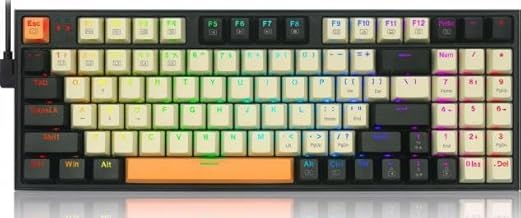
90% compact layout keeps NumPad & arrows, vibrant RGB, programmable macros and smooth red switches—great for gaming, streaming, and saving desk space.
$44.99 on Amazon
For MMO or strategy players who prioritize mouse freedom and a sturdy, budget-friendly deck, the K552P TKL is a reliable baseline. You can set up macros through software and keep your main cluster clean, while hot-swappable sockets let you try different switch types until your keyfeel is dialed. Per-key lighting modes are plentiful for a compact board, so you can color-group keybinds and quickly spot critical actions.
You won’t get a macro column, and macro access depends on how you map layers or function combos, but the payoff is clear: a compact, durable board that opens your mousing space for precise camera control and kiting. If you’re cost-conscious or building a portable setup, the K552P is a solid mechanical starting point that still respects MMO needs.
FAQ
- Are macros allowed in MMOs like WoW and FFXIV?
Most MMOs allow keybinding and simple macros that replicate normal user inputs. However, policies typically prohibit automation that plays the game without you. Stick to one-press-per-action style macros that don’t loop or add delays beyond normal keypress behavior. Always review your game’s current ToS.
- How many macro keys do I actually need for raiding?
For many players, 5–6 dedicated keys cover core utility: target markers, focus cast, interrupts, defensives, and a few raid callouts. If you juggle multiple roles or classes/jobs, a macro pad with 12–15 labeled keys (and multiple pages) provides room to grow without re-learning layouts.
- Do I need onboard memory for profiles?
Onboard memory is convenient if you use multiple PCs or don’t want background software running. If you’re on a single machine and keep the companion software open anyway (e.g., for RGB/OBS control), software-only profiles can be fine. QMK/VIA users often save mappings into firmware so their layout travels with the board.
- Keyboard with macro column vs. separate macro pad—what’s better?
If you want simplicity and a smaller footprint, a keyboard with 5–6 macro keys is great. If you need lots of labeled commands, stream controls, and flexible paging, a macro pad is better—and it pairs well with any favorite mechanical keyboard.
- Wired or wireless for MMO keyboards?
Wired is still the latency-safe default, though modern 2.4 GHz links are excellent. If you go wireless, look for a fast polling rate, a strong dongle connection, and a battery big enough to handle RGB during long sessions. Tri‑mode boards are great for multi-device setups.
The Final Bind: Pick the Board That Matches Your Raid Plan
Here’s the quick match-up:
- Want dedicated macro keys with mechanical switches and a handy control wheel? Choose the Redragon K580 VATA. It’s the most “MMO-keyboard” pick here with on-the-fly macro recording.
- Need even more dedicated macros and a comfy wrist rest, but don’t require true mechanical switches? The Redragon K512 Shiva gives you six macro keys and marathon comfort.
- Prefer a flexible, labeled command center alongside your existing keyboard? The N1 Macro Pad’s 15 LCD keys and “Action Flow” sequencing are perfect for raid roles and stream control.
- Crave deep programmability and a clean desk across multiple devices? The Redragon K742 with QMK/VIA layers is a powerhouse—no macro column, but nearly unlimited macro potential once set.
- Want a compact layout with a numpad and software-programmable macros? The Redragon K636CLO balances desk space, RGB, and per-key remaps.
- Building a budget, space-efficient rig with room to experiment with switches? The Redragon K552P TKL gets you hot‑swap flexibility and software macro support in a tough chassis.
Whichever route you choose, prioritize macro access you’ll actually use in combat: clear labeling, quick profile switching, and bindings that don’t compete with core movement. Lock in your rotation, keep utility on tap, and let the keys do the heavy lifting so you can focus on mechanics—and the win.






Leave a Comment