

Best Digital Voice Recorders for Lectures: Battery Life and Noise Reduction
If you’ve ever hit “record” at 8 a.m. only to run out of power before the final Q&A, you know the stakes: a lecture recorder lives or dies by battery life and the ability to cut through room noise. Today’s compact recorders pair long runtime with smart noise reduction and voice activation, so you capture what matters and skip the dead air. The picks below focus on the features lecture-goers actually need—endurance, clarity, and easy file handling—without burying you in gimmicks.
Why battery life and noise reduction are make‑or‑break for lectures
Lecture days are long. A typical seminar block can span four to six hours; conference days often run twice that. A good recorder should comfortably outlast your schedule with headroom for breaks, side conversations, and after-class discussions. Battery life isn’t just about raw capacity—it’s also about smart features that stretch every milliamp, like voice activation that records only when someone is speaking.
Noise reduction matters because lecture halls are noisy by design. HVAC hum, projector fans, paper shuffles, and keyboard clicks all compete with the lecturer’s voice. AI noise reduction can identify and suppress ambient noise so voices stay intelligible. Combine that with sensible placement (front row, on a desk, or clipped to a podium) and you’ll get crisp notes without wrestling in post.
From lecture halls to meeting rooms: common use cases
Students need set‑and‑forget reliability for back‑to‑back classes, with files organized by course and date. Researchers and grad students often record long colloquia and need dependable storage for raw data. Professionals rely on recorders for meeting minutes and interviews, where concise capture (thanks to voice activation) reduces editing time.
In all these scenarios, two realities persist: you’ll often be far from power outlets, and you can’t predict acoustics. A recorder that’s conservative with power and aggressive about speech clarity will save the day. If you frequently review audio, features like on‑device playback and track navigation also speed your workflow.
How to shop for the right lecture recorder
- Battery and endurance: Look for long continuous recording specs and features that extend runtime—voice activation, low‑power standby, and efficient codecs. When exact battery hours aren’t listed, prioritize recorders with voice activation and efficient noise reduction to minimize wasted capture.
- Noise reduction and mic design: AI noise reduction helps isolate speech in buzzy environments. Voice‑activated triggering cuts empty room tone. If you sit farther back, sensitive microphones or multi‑mic arrays can help, but good placement beats raw sensitivity.
- Storage and formats: Modern units offer 64–136GB and beyond—plenty for a semester. Check whether they support common formats like MP3 or WAV for easy sharing and editing. Large capacity is only useful if your workflow can move those files off quickly.
- File transfer and workflow: USB‑C simplifies connecting to modern laptops and tablets; simple drag‑and‑drop is faster than proprietary software. If you need transcripts, an AI recorder with real‑time transcription can skip manual typing—just remember that advanced processing draws more power.
- Controls and portability: Physical switches for quick start, an easy voice‑activation toggle, and clear indicators help when you’re rushing between classes. Pocketable designs are less intrusive and can live in a pencil case.
Selection criteria for this roundup
- Strong battery story for full‑day lecture capture (native longevity and/or voice activation to extend runtime).
- Effective noise reduction or voice‑activation features to keep speech clear and files concise.
- Sufficient storage (64GB or more) to avoid mid‑semester juggling.
- Straightforward file transfer (ideally USB‑C or reliable wired transfer).
- Practical design touches for lecture use: compact form factor, easy controls, playback support, or mounting options.
- Bonus points for modern extras like AI transcription, summaries, or magnetic mounting—when they help real workflows.
1. Tallkcoder 64GB Voice‑Activated Recorder — marathon storage with AI noise cleanup

Clip-on, one-touch voice recorder with 64GB/40hr battery, VA mode and HD noise reduction — grab crisp, worry-free recordings on the go.
$39.99 on Amazon
View on AmazonPrice and availability are accurate as of 01/27/2026 10:22 pm GMT and are subject to change.
If you want to record everything and worry later, this 64GB Tallkcoder is built for endurance. The headline stat—up to 4,800 hours—signals extreme storage efficiency at low bitrates, making it a solid choice for students who archive entire terms. Pair that capacity with voice activation, and you’ll capture speech while skipping long silences, a combination that also helps your battery go the distance on days packed with classes.
AI noise reduction is tuned for speech, which means HVAC and projector hum get tamped down while voices come forward. That’s especially useful in large halls or when you can’t sit right up front. While the listing doesn’t advertise a USB‑C port or companion app, standard wired transfer keeps file offloading simple. Choose higher quality for critical lectures and low‑bitrate for routine notetaking.
2. AI Voice Recorder — 80GB with real‑time transcription and multilingual AI summaries

AI recorder: real-time translation (134 languages), secure lock, dual mics up to 8m, photo-sync & long battery — perfect for meetings. Learn more.
$99.99 on Amazon
View on AmazonPrice and availability are accurate as of 01/27/2026 10:22 pm GMT and are subject to change.
If your bottleneck is review time, this AI‑forward recorder changes the math. It records lectures while generating real‑time transcripts and even summaries across 134 languages—ideal for international courses and multilingual conferences. The result: you’ll spend less time scrubbing through audio and more time actually learning or writing.
With 80GB on board, it handles multiple long sessions before you need to offload. Be mindful that live transcription and AI summarization draw more power than a simple audio capture device, so keep voice activation on and bring a power bank during marathon events. For classrooms, the combination of searchable text and recorded audio makes studying more efficient: scan the transcript, then jump to key moments to hear tone and context.
3. 136GB Magnetic Voice‑Activated Recorder — AI triple noise reduction plus flexible placement

Price and availability are accurate as of 12/26/2025 05:17 am GMT and are subject to change.
Max out capacity and keep your placement options open. With 136GB, this recorder swallows extended lecture series without a second thought. The magnetic back lets you discreetly mount near the front of the room—think lectern frame or a metal chair—improving speech pickup while AI triple noise reduction works to tame room noise. It’s a powerful combo for boomy spaces where the lecturer moves around.
The compact, mountable design suggests simple controls, which is often a plus when you’re rushing between rooms. Because the listing doesn’t spell out battery hours, lean on voice activation so you capture only speech—great for both endurance and file hygiene. If you frequently sit mid‑room or farther back, that magnetic flexibility can make a noticeable difference in clarity.
4. 72GB Voice Recorder — voice‑activated with a stated 25‑hour battery and AI noise reduction

Price and availability are accurate as of 12/26/2025 05:17 am GMT and are subject to change.
If you want a concrete battery claim, this 72GB model advertises a 25‑hour battery—enough for all‑day symposia or a multi‑class block with headroom. Add voice activation, and the real‑world endurance stretches further by cutting long gaps of silence. For students who prefer set‑and‑forget reliability, that’s the kind of cushion that removes anxiety.
AI noise reduction focuses on keeping speech intelligible even when fans, murmurs, and keystrokes are in the background. With 72GB on hand, you can hold a week or more of recordings at moderate quality before offloading. It’s a balanced choice: a dependable battery story, practical storage, and clarity‑minded processing without unnecessary complexity.
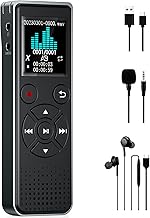
5. 128GB Voice‑Activated Digital Recorder — USB‑C and MP3 playback for modern workflows
Price and availability are accurate as of 12/26/2025 05:17 am GMT and are subject to change.
For a clean, modern workflow, USB‑C is a small feature that makes a big difference—no adapters, faster transfers, and broad compatibility with laptops and tablets. Combine that with 128GB and voice activation, and you’ve got a practical, student‑friendly recorder that’s easy to unload after class and quick to queue up for review.
MP3 playback lets you skim on the device before deciding what to archive or annotate on a computer. Since battery hours aren’t listed, use voice activation and efficient recording settings for long days. If you prefer straightforward files and plug‑and‑play transfers without AI extras, this is a sensible, reliable option.
6. 128GB Voice‑Activated Recorder — rechargeable and ready for lecture marathons

Price and availability are accurate as of 12/26/2025 05:17 am GMT and are subject to change.
If you want a rechargeable workhorse, this 128GB model focuses on fundamentals: solid capacity for multiple courses, voice activation to maximize uptime, and a rechargeable battery so you’re not buying disposables mid‑semester. It’s a dependable companion for routine note capture in lectures, meetings, and interviews.
Use voice activation to trim idle time and stretch between charges, especially on days with multiple sessions. While it doesn’t advertise AI transcription, the simplicity is a virtue if your workflow is record‑transfer‑review. Keep a short charging routine in your weekly schedule, and you’ll have consistent power without the clutter of spare batteries.
FAQ
- How many hours of battery life do I need for lectures?
Aim for 8–10 hours minimum for a full day, but more is better. If exact specs aren’t listed, voice activation can dramatically extend practical runtime by recording only when someone is speaking. Lower‑bitrate settings also reduce power draw.
- Is AI noise reduction worth it in real classrooms?
Yes. It helps suppress steady noises like HVAC hum and projector fans, improving vocal clarity. It won’t fix bad mic placement, so position the recorder close to the lecturer when possible, or use mounting options to get line‑of‑sight.
- Do I need real‑time transcription?
If you rely on searchable notes or quick summaries, real‑time transcription saves hours. For straightforward review or studying by listening, a traditional recorder with strong battery life and noise reduction is often enough.
- How much storage is enough for a semester?
With efficient settings, 64GB can carry weeks of lectures; 128GB–136GB adds generous headroom. Keep in mind that higher quality consumes more space. Offload regularly to keep your device organized and ready.
- What’s the easiest way to move files to a laptop or tablet?
Wired USB transfer is the most reliable and universal. USB‑C offers the smoothest experience on modern devices. Drag‑and‑drop file handling avoids proprietary software and speeds up your post‑class routine.
The Takeaway: Match your recorder to your lecture day
Battery life and clarity trump everything when you’re capturing long talks in imperfect rooms. For set‑and‑forget recording with massive storage, the Tallkcoder 64GB and the 136GB Magnetic model offer endurance and smart noise handling—ideal if you archive lots of audio. If you need concrete battery guidance, the 72GB unit’s stated 25‑hour rating provides confidence for long events.
Prefer a modern workflow? The 128GB USB‑C recorder keeps transfers painless and playback handy. Need text fast? The 80GB AI Voice Recorder’s real‑time transcription and multilingual summaries flatten your review time. Want a simple rechargeable daily driver? The 128GB Rechargeable model nails the essentials with voice activation to stretch between charges.
Choose the one that fits your schedule and study style, enable voice activation, position it smartly—and you’ll finish the day with clean, complete notes and power to spare.






Leave a Comment