

The 5 Best Keyboard Trays and Risers for Healthier Typing (Under-Desk, Adjustable, and Standing Desk-Friendly)
If your wrists ache or your shoulders creep toward your ears by mid-morning, your keyboard setup is likely to blame—not your workload. A well-chosen keyboard tray or riser can move the keys to the right height and angle, so your wrists stay neutral, your elbows rest near 90 degrees, and your shoulders finally relax. The result is less strain and more endurance, whether you type for two hours or ten.
Below, you’ll find a curated list of trays, rails, and desktop risers that span desk types and budgets—from simple acrylic tilt stands to a clamp-on rail set for a truly adjustable, under-desk platform.
Why this category matters for comfort and productivity
The healthiest typing position keeps your wrists straight (not bent up or down), your forearms parallel to the floor, and your keyboard slightly below elbow height. Most desks are too high for this, which forces you to hike your shoulders or extend your wrists—both common paths to discomfort.
A keyboard tray or riser solves this in one of two ways. Under-desk trays bring the keyboard down to your lap level, dialing in elbow height and tilt. Desktop risers set a steady, consistent angle that helps you avoid wrist extension when a tray isn’t an option.
Posture gains translate directly to precision and speed. When your wrists are neutral and your shoulders are at ease, finger travel is smoother and small hand muscles don’t fatigue as quickly. That’s true at a sitting workstation and arguably more important at a standing desk, where a slight tilt can make (or break) comfort.
Picking the right format for your desk and workflow
Different desks call for different solutions:
- Fixed desks with limited underside clearance: Desktop risers shine here. They require no installation, work with any surface, and clean up your cable path.
- Desks with a clean, clampable edge: Under-desk rails let you position the keyboard lower than desktop height—ideal for neutral elbows and for freeing desk space.
- Sit-stand desks: The best results come from a tray that can move with the desk and offer height flexibility. Clamp-on rail systems are often easier than drilling into the desktop or crossbar.
Also consider your mouse. If you use a full-size keyboard, you may want a wider platform or a separate mouse solution that stays at the same height and angle as your keys. If you swap between writing and typing often, quick adjustability matters so the tray doesn’t become an obstacle.
What “adjustability” really buys you
Tilt, height, and reach each play a role:
- Height: Under-desk trays reduce the vertical distance from elbow to keys. Even a 1–2 inch drop can eliminate shoulder shrugging.
- Tilt: A gentle positive tilt (rear higher than front) can feel natural at a seated desk, while a mild negative tilt (front higher) is often preferred when standing to avoid wrist extension.
- Reach: Sliding trays bring the keyboard closer to your natural typing zone, easing upper back strain and preventing forward lean.
A one-angle riser won’t replace the fine-tuning of a true adjustable tray, but it can still deliver real relief by curbing wrist extension and encouraging a consistent hand posture.
Selection criteria we used
- Ergonomic potential: Ability to support neutral wrist posture via height and/or tilt.
- Stability: Non-slip surfaces, sturdy materials, and wobble-free typing feel.
- Platform size: Space for standard and compact keyboards; potential mouse space.
- Desk compatibility: Works with common desktop thicknesses and edge profiles; fits around crossbars on sit-stand frames where relevant.
- Installation: Clear, low-risk install versus DIY complexity; no-drill options where possible.
- Adjustability range: Height and angle options, or at least a well-chosen fixed angle.
- Wrist support: Built-in rests or compatibility with separate wrist pads.
- Materials and durability: Acrylic clarity and thickness; quality clamps/rails for under-desk solutions.
- Cable management: Openings or clearance for clean routing.
- Value: Real ergonomic benefit at a fair cost for the category.
The Best Keyboard Trays and Risers
1. Clear Acrylic Tilted Keyboard Stand — simple, stable riser for everyday typing

Low Front Lip on the End – keyboard riser for desktop holds slimline keyboard, prevents it from falling off the PC keyboard stand when typing. Dimensions – 17″L x 5.5″W x 1.5″H, the keyboard holder fits most standard full size keyboard and desk keyboard drawer, an acrylic tray designed in all its simplicity. Ergonomic Design – tilted keyboard stand raises flat keyboard at the right angle and height, a slant improves neck shoulder wrist issues and body posture by taking away the stress, makes typing more easier and comfortable. Non-Slip Silicone Strip – Environmental friendly non-toxic and odorless anti-slip silicone material instead of using cheap rubber strip that fully wraps the keyboard tray from back side by protecting your home office table, sturdy and no slide. Premium Material & Well Crafted – Smooth rounded edegs and corners with polished finishing, simple and elegant office essential, the acrylic keyboard tray can be used as a desktop whiteboard, a little acrylic memo board to remind you of daily tasks or project deadlines.
$12.99 on Amazon
View on AmazonPrice and availability are accurate as of 01/07/2026 06:08 pm GMT and are subject to change.
This minimalist riser is a clean fix when your desk is a touch high and you tend to crank out emails for hours. The angled surface reduces wrist extension, which can ease pressure on tendons and nerves. The silicone grip keeps heavier keyboards in place, and the transparent acrylic blends into any setup.
If you can’t install an under-desk tray, this is a low-risk way to make seated typing more comfortable. Pair it with a soft wrist pad if you like resting your palms between bursts. For standing work or frequent height changes, you’ll want an adjustable tray instead.
2. BEEGO Clear Acrylic Ergonomic Keyboard Riser — stability with a splash of color

ERGONOMIC – The tilt angle of the keyboard stand makes typing more comfortable, with the keyboard raised on this angled acrylic stand, it helps reduce strain on your wrist and neck for long hours typing at work or home office, keyboard stand for desktop also keeps your desk neat and clean by giving a minimalistic look. ANTI-SLIP CASE – Molded silicone strip assembled on bottom back and rubber pads underneath the front lips of the acrylic design computer keyboard stand securely hold your keyboard in place, no wobbling, so you don’t have to worry about any noises or movement of the acrylic keyboard tray itself sliding around on the desk. LOW FRONT STOPPER – Hot bending short front block on two sides makes sure it won’t interfere with your typing productivity, acrylic keyboard stand measures 17 inches wide and holds both full size keyboard and compact keyboard as you like, it keeps your workspace tidy and organized, keyboard riser for desk adds an aesthetic touch to your desk. NO ASSEMBLY – Keyboard lift elevates your work keyboard and enhances desktop setup both aesthetically and functionally, acrylic keyboard holder designed with it’s simplicity improves your typing experience while optimizing comfort and ergonomics, it’s a clever, elegant organization solution for office employees, nice addition to your office desk accessories. Keyboard Stand – made of thick acrylic, keyboard elevator is solid and sturdy, modern and sleek, it does not take a lot of space on your desk, inclination of the tray lifts your keyboard up just enough and makes it easy to use, acrylic keyboard riser provides optimal support to your wrists and reduces fatigue at work for typing all day, it makes a cute office supplies and nice office essentials.
$12.98 on Amazon
View on AmazonPrice and availability are accurate as of 01/07/2026 06:17 pm GMT and are subject to change.
Functionally similar to other acrylic risers, this model stands out for its pink non-slip strip, which is easy to spot and line up with your keyboard’s feet. It’s a fit for compact spaces and anyone who wants a cleaner cable path than flip-out keyboard feet provide.
The riser helps keep wrists closer to neutral without the wobble of improvised props. If your mouse needs to match height, consider a thin mouse wrist pad to keep both sides of your setup in the same plane.
3. Richboom Clear Acrylic Tilt Keyboard Stand — budget-friendly angle correction

Keyboard Holder Dimensions – 17″L x 5.5″W x 1.5″H, keyboard holder for desk holds standard regular computer keyboard with it’s sturdiness. Won’t take up too much space of your home or office desktop. Ergonomic Design – Low front lips at each end of computer keyboard stand, almost no contact with your hands when typing on the keyboard tray, it also keeps the keyboard from sliding. Silicone Strip on Bottom Back – Silicone strip at the bottom back of keyboard tray prevents keyboard holder from sliding and protect your table, silicone material with better anti-slip property than traditional rubber. Premium Acrylic – Sturdy and durable, smooth rounded edges and corners, polished finishing, artfully designed with it’s simplicity, fits with most home decors, a great and elegant setup for home office. Posture Correction – Ergonomic slanted, lifts flat keyboard in a nice angle and height, keeps your body away from wrist issues and protects your body from unnecessary neck and shoulder pain.
$10.97 on Amazon
View on AmazonPrice and availability are accurate as of 01/07/2026 06:18 pm GMT and are subject to change.
For a straightforward, low-cost upgrade, this riser delivers the core benefit: a consistent typing angle that encourages better wrist alignment. The clarity and small footprint keep the desktop uncluttered, and setup is instant—just set it down and type.
It’s best suited to seated work at a standard desk height. If your forearms angle upward to the keyboard, a true under-desk tray will address height more effectively than any on-desk riser.
4. Acrylic Keyboard Riser with Wrist Rest and Storage Tray — comfort plus organization
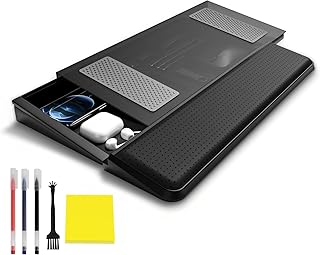
3 Pen & 1 Keyboard Brush & 1 Sticky Note: The acrylic keyboard stand with 3 pens & keyboard brush & 1 note is the perfect desktop note-taking companion. Effectively organizes your to-do list or reminders instead It also comes with two anti-slip strips and a tray, Which will keep you from the misery of conservative keyboard movement, and the tray gives you to help you organize most of your desktop items. Practical Storage Tray for Streamlined Tidiness: The keyboard riser with a practical storage tray is perfect for keeping all your essential supplies and accessories close at hand. The storage tray underneath is perfectly compatible with your magic keyboard, Magic mouse, Airpods, and other office supplies, Keeping your desk tidy and items dust-free as well. Say Goodbye to Sliding Disasters: Comes with our keyboard stand base with 6 non-slip rubber bumps, We also added 2 more anti-slip pads to the bracket providing decent support for your wrists during long typing sessions, Providing a comfortable & durable & skin-friendly touch, while ensuring stability and not easy to out of shape, No more annoying swiping or typing wobbles. Enjoy Ergonomics Bliss: Unmatched build quality and durability The keyboard stand for the desk is equipped with a wrist rest that is made of soft and breathable PU leather and high-quality acrylic panel brackets, Protect your body from neck and shoulder problems, Experience the ultimate blend of style, comfort, and functionality, making every keystroke a symphony of productivity. Perfect Size Gift: The stand measures 16.9 x 7.9 x 2 inches, while the palm rest measures 16.9 x 4.3 x 1.4 inches. Our keyboard stands and wristrests are a little wider than any other on the market. Can accommodate keyboards of various sizes such as mechanical keyboards, Standard keyboards, thin keyboards, Magic keyboards, and mini keyboards, Fitting your oversized keyboards perfectly. We’ve Got You Covered: If you encounter any problems with our Haonon product keyboard stand, You can contact us at any time, We will reply to you within 16 hours to help you solve your problem.
$29.99 on Amazon
View on AmazonPrice and availability are accurate as of 01/07/2026 06:21 pm GMT and are subject to change.
If you like resting your palms between tasks or you want to tame desk clutter, this combo riser is compelling. The wrist rest cushions the contact point many typists use to steady their hands, potentially easing discomfort during long sessions. The under-keyboard storage keeps small items at hand while leaving your main surface clear.
Because the tilt is fixed, the ergonomic gains come from consistent angle and pressure relief rather than micro-adjustments. If you’re sensitive to wrist-rest firmness, consider pairing with a soft gel pad for a bespoke feel.
5. Ergonomic Acrylic Keyboard Stand Riser — light pink finish for compact, stylish setups
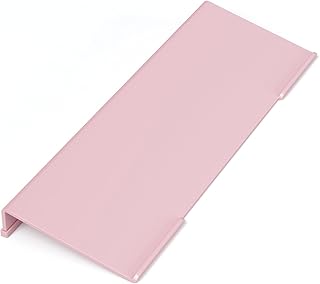
Ergonomic Design: keyboard stand for desktop is made for more comfortable typing, the inclination of the keyboard tray is appropriate, not too high, not too flat either, places the keyboard at just the right angle and greatly improves your ergonomic home office setup. The acrylic design keyboard riser provides comfortable support, reduced strain and fatigue on your neck and wrists, for anyone spending long hours typing away at a desk, the keyboard lift is a game changer for work comfort. Low Front Lips: computer keyboard stand enhances your setup both aesthetically and functionally without hindering your typing, sleek design of keyboard riser also complements your workspace nicely by providing excellent support during long typing sessions, with the keyboard raised, this one-piece art is an elegant office desk organization solution to clean your desk much easier. Keyboard stand for desk is a nice addition to your office desk accessories. Non-Skid Silicone Pads: unlike other cheaply made rubber case that falls off right away when taking out from the packing box, our keyboard riser is equipped with a quality anti-slip silicone strip that strongly attached to the bottom back of the keyboard holder, stopping it from sliding around or wobbling on your desktop with no scratch, by sticking the little pads on the surface of the acrylic keyboard tray it keeps your keyboard stay in place. Perfect Size – keyboard riser for desk is an office essential to your computer desk accessories, the angled stand measures 17 inches wide, fitting keyboards of all size range – 60%, 65%, 75%, TKL, full size. Light-weight and can fit in your bag to carry with if needed. The well built construction and quality fits into a variety of workspaces, the computer keyboard stand for desk doesn’t take a lot of space. Easy to Use: no assembly, clean and minimal, acrylic keyboard stand is compatible with magic keyboard, thin keyboard, mini keyboard, full-sized keyboard. Computer keyboard holder enhances your typing experience with stability while prioritizing comfort and ergonomics, makes a great addition to office supplies. Discover the fun and surprise your wrists with this ergonomic keyboard stand.
$11.99 on Amazon
View on AmazonPrice and availability are accurate as of 01/07/2026 06:26 pm GMT and are subject to change.
This riser is a style-forward take on the classic acrylic stand. It’s a match for compact desks, laptops paired with external keyboards, and home offices where a bit of color wins over strictly utilitarian gear. The angle is gentle enough for daily use while reducing wrist bend compared to flat typing.
Like all on-desk risers, it won’t solve a large height mismatch between your elbows and keys. If you catch yourself hiking your shoulders or reaching forward, look to an under-desk tray solution.
FAQ
- Are desktop risers or under-desk trays better for posture?
- Under-desk trays typically win because they lower the keyboard below desktop height, aligning it with your elbows. Desktop risers improve wrist angle but don’t reduce height, so they’re best when a tray isn’t practical.
- What keyboard angle is healthiest?
- For seated work, a slight positive tilt can feel natural, but the priority is neutral wrists. For standing, a mild negative tilt often prevents wrist extension. Start small—just a few degrees—and adjust based on comfort.
- Will these work with mechanical keyboards?
- Yes. Acrylic risers handle most compact, tenkeyless, and full-size boards. For very heavy keyboards, choose thicker acrylic and non-slip surfaces. Under-desk rails are agnostic—just ensure the platform is wide and strong enough.
- How do I know if a clamp-on rail set will fit my desk?
- Check edge thickness, the presence of a beveled or rounded lip, and under-desk obstructions like support bars or drawers. You need a flat section where clamps can bite securely and room underneath for the tray to slide.
- How do I set up for a standing desk?
- Adjust desk height so your elbows are near 90 degrees, keep wrists straight, and consider a slight negative keyboard tilt. If using rails, pick a tray mechanism that lets you change height or angle as you switch between sitting and standing.
Your Setup, Solved: Match the Right Tray to Your Workspace
Finding the right keyboard platform starts with your desk and how you work:
- If you need fast, no-install comfort at a fixed-height desk: The Clear Acrylic Tilted Keyboard Stand and the Richboom Tilt Stand are simple, stable angle fixes that tame wrist extension without cluttering your space.
- Prefer a little personality with your grip: The BEEGO Acrylic Riser and the Light Pink Acrylic Stand add non-slip stability and color without sacrificing clarity.
- Want comfort plus organization: The Acrylic Riser with Wrist Rest and Storage Tray adds palm cushioning and stashes small tools so your desktop stays clean.
- Ready for true height control (and standing desk compatibility): The VIVO MOUNT-RAIL02H clamp rail set is the adjustable foundation to place your keyboard where it belongs—below elbow height—with the option to build a mouse-friendly platform.
The bottom line: if your desk height is the main issue, go under-desk. If wrist angle is your pain point and installation isn’t possible, pick a steady, non-slip riser. Either way, aim for neutral wrists, relaxed shoulders, and a layout that keeps your keyboard and mouse at the same height. Small ergonomic shifts add up—your hands and neck will notice the difference by week’s end.








Leave a Comment