

Smart Plugs That Make Old ACs Feel New: The Best High‑Wattage Picks for Window and Portable Units
If your home still relies on a trusty window or portable AC, a high‑wattage smart plug can make it smarter in minutes. Picture this: you tell your voice assistant to “pre‑cool the bedroom,” your AC turns on right away, and the room is comfortable by the time you walk in. Or your plug schedules the AC to run during cheaper off‑peak hours, trimming your bill without sacrificing comfort. That’s the promise—and with the right plug, it’s genuinely achievable.
Below, we dive into the best smart plugs for air conditioners—specifically models capable of handling higher loads. We’ll cover how to pick the right one, how to set money‑saving schedules, what to expect with older units, and the safety checks you should make before you plug anything in. The goal: make that “dumb” AC instantly more convenient and cost‑efficient.
Why smart plugs for ACs matter
Even a small window AC can draw serious power, and many older units lack modern controls. A properly rated smart plug adds:
- Remote on/off control: Turn the AC on as you leave the office or off if you forgot it running.
- Schedules and routines: Pre‑cool before bedtime, then auto‑shutoff while you sleep.
- Voice control: Hands‑free comfort via Alexa or Google Assistant.
- Energy awareness: Fewer “oops, I left it on all day” moments.
For renters and anyone not ready to replace an AC, a high‑wattage smart plug is the fastest, cheapest way to modernize cooling.
How to use schedules and voice commands to save money
- Pre‑cool at the right time: If your utility has peak and off‑peak rates, schedule your AC to run hardest just before peak pricing begins, then coast. For example, start cooling 30–60 minutes before you arrive home so you don’t blast it at the most expensive hour.
- Sleep and wake routines: Set the AC to run cooler as you fall asleep, then raise the temperature or shut off in the early morning when outside air is cooler.
- Geofenced automation: Use your assistant’s routines to turn the AC off when everyone leaves and on as someone heads home.
- Voice failsafe: If a schedule doesn’t fit the day, just say “Alexa, turn on the bedroom AC” and you’re back in control.
What to know before you shop
- Check the AC’s nameplate: You’ll find voltage (typically 120 V for window/portable units), frequency (60 Hz), and amperage. Many window units draw 4–10 A running; larger portable units can approach the 12–13 A range. A high‑wattage smart plug typically supports up to 15 A at 120 V.
- Restart behavior matters: A smart plug can only cut and restore power. If your AC uses old‑school mechanical knobs or has an “auto‑restart” feature, it will come back on at its last settings. If it requires pressing a soft‑touch power button each time, the plug can’t turn it on after a full power cut.
- Wi‑Fi vs. long‑range options: Most plugs use 2.4 GHz Wi‑Fi and work in seconds. If your AC is in a detached garage or a Wi‑Fi dead zone, consider a long‑range plug that uses a hub.
- Don’t overload: Starting current for compressors can be higher than the running current. Give yourself headroom; don’t run a 14 A load on a 15 A plug, and avoid using power strips.
Clear safety warning
Always verify the AC’s amperage against the plug’s maximum rating, and allow a margin for startup surges. Plug the AC directly into a properly grounded wall outlet (not a power strip or extension cord) on a dedicated circuit if possible. If your unit is 240 V or uses a special plug, do not use a standard smart plug.
Selection criteria: how we chose the best high‑wattage smart plugs for ACs
- 15 A rating or clear suitability for typical window AC loads
- Reliable app scheduling, timers, and routine compatibility
- Voice control via Alexa and/or Google Assistant
- Solid build quality and reputable brand support
- Compact body that minimizes outlet blocking
- Useful extras such as Bluetooth fallback or long‑range hub options
- Clear documentation and safety certifications
1. Wyze Smart Plug 2-Pack — Best overall high‑wattage plug for window and portable ACs

Price and availability are accurate as of 12/22/2025 09:37 pm GMT and are subject to change.
Wyze hits a sweet spot for AC duty: straightforward setup, strong automation tools, and a full 15 A rating many window and portable units require. The Wyze app makes it simple to build money‑saving schedules—pre‑cool before you get home, switch off at bedtime, or coordinate with sunrise/sunset. Voice control through Alexa and Google Assistant is responsive, and pairing is quick.
For most users, this is the best “drop‑it‑in and go” choice to make an older AC smart. You don’t need a hub, and the plug’s compact size works well on standard wall outlets. Just verify your AC will auto‑restart after power is restored; if it does, the Wyze Plug can handle the on/off automation while you keep using the AC’s own temperature dials and fan settings.
2. Feit Electric Smart Plug 2-Pack — Most dependable 15 A plug for simple schedules

Price and availability are accurate as of 12/22/2025 09:37 pm GMT and are subject to change.
If you want a tough, no‑nonsense smart plug that reliably toggles an AC on time, Feit Electric’s 15 A plug is a standout. It’s compatible with Alexa and Google Assistant for voice control, and the scheduling tools cover the essentials: daily and weekly programs, timers, and handy “vacation” behavior if you want occasional cycling for airflow.
This is a great pick for households that prize reliability and simplicity. It’s especially good for consistent routines—say, cooling a home office on weekdays and switching off automatically at closing time. As with any smart plug, verify your AC’s amperage and restart behavior. If your unit comes back to its last settings after a power cut, Feit’s plug can execute your schedule without fuss.
3. Govee Dual Smart Plug 2-Pack — Best dual‑outlet option for a small window AC plus a fan

Control two devices from your phone or by voice, compact dual smart plugs with Wi‑Fi/Bluetooth and Alexa/Google support. Easy setup, helps save energy.
$48.98 on Amazon
View on AmazonPrice and availability are accurate as of 01/30/2026 09:33 pm GMT and are subject to change.
Govee’s Dual Smart Plug is clever for tight spaces and multi‑device setups. You can control a small window AC on one outlet and a circulating fan or dehumidifier on the other—each on its own schedule or voice command. Bluetooth support helps with fast local control and pairing, and the Govee app is feature‑rich, offering timers, scenes, and integrations with other Govee gear.
Important caveat: while the overall unit supports higher loads, each individual outlet is typically limited below a full 15 A. That means it’s appropriate for smaller window ACs with modest draw, not for larger portable units that push the upper range. Check your AC’s nameplate; if it’s within the outlet limit and auto‑restarts after power is restored, this dual‑outlet design can automate a complete comfort setup in one tidy package.
4. Amazon Smart Plug — Smoothest Alexa experience for high‑wattage ACs

Turn any outlet smart with this compact Alexa plug, easy setup, no hub, voice control, auto-reconnect, and room to spare for another plug.
$24.99 on Amazon
View on AmazonPrice and availability are accurate as of 01/30/2026 09:34 pm GMT and are subject to change.
If your household runs on Alexa, Amazon’s Smart Plug is the easiest path to a “smart” AC. Setup takes moments, and you can create routines like “Arrive Home” to pre‑cool, or “Goodnight” to switch the unit off automatically. The 15 A rating covers most 120 V window and portable units, and reliability is a strong suit.
This plug shines when you lean on Alexa’s ecosystem: geofenced arrivals/departures, schedules tied to sunrise/sunset, and Room/Group control. Trade‑offs include Alexa‑only compatibility and no energy monitoring. As always, confirm your AC’s restart behavior—if your unit powers itself back up after a power cut, the Amazon Smart Plug gives you voice control and automation without replacing the appliance.
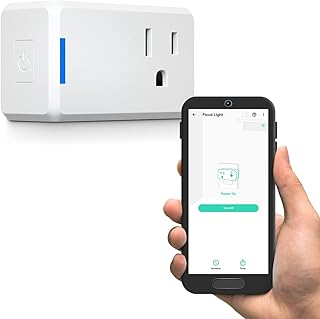
5. YoLink Mini Plug — Best long‑range solution for garages, basements, and outbuildings
Price and availability are accurate as of 12/22/2025 07:42 pm GMT and are subject to change.
AC in a detached garage? Basement laundry room? Far end of a large home? YoLink’s hub‑based long‑range system solves the connectivity problem ordinary Wi‑Fi plugs can’t. The Mini Plug communicates over a low‑power, long‑distance radio that reaches where routers won’t, so your schedules and automations actually run. It supports voice control via Alexa and Google, and the hub can handle local routines that aren’t internet‑dependent.
It’s a fantastic fit for dehumidifiers, shop spaces, or a workroom AC you want to run only during certain hours. You’ll need the YoLink hub, and the setup is a touch more involved than typical Wi‑Fi plugs—but the reward is reliable control in places where you’ve given up on smart devices. As with all picks here, treat the plug as a high‑wattage controller: verify your AC’s amperage and confirm it restarts automatically after power is restored.
FAQ
How do I know if a smart plug can turn my AC back on?
A smart plug turns power off and on; it doesn’t press buttons. If your AC uses mechanical knobs or has an “auto‑restart” feature, it will resume the last setting when power returns—perfect for plug control. If your AC requires pressing a soft power button every time, a smart plug can’t bring it back online after a full power cut.
Is a 15 A smart plug enough for my window or portable AC?
Often, yes—but check the nameplate on your AC. It lists the amperage. For 120 V units, many window ACs draw 4–10 A. Larger portable units can approach the upper range. Choose a plug rated for at least the running amperage of your AC, and leave headroom for startup surges. If your unit is near the limit, use a dedicated wall outlet and avoid extension cords or power strips.
Can a smart plug control temperature or change fan speeds?
Smart plugs don’t set temperatures; they only control power. Your AC’s own thermostat and fan controls still handle cooling level and airflow. If your AC is IR‑remote based and you want to adjust temperature and modes without touching the unit, a dedicated Wi‑Fi AC controller (IR blaster) may be a better match—but it’s a different category than the high‑wattage plugs featured here.
What’s the best way to schedule an AC to save money?
- Pre‑cool: Run the AC 30–60 minutes before you arrive, then reduce runtime during peak rates.
- Sleep schedule: Cool the room at bedtime, then shut off or scale back near morning.
- Geofencing: Use assistant routines to switch off when everyone leaves the house.
- Fail‑safes: Add an “off at midnight” catch‑all to prevent all‑night running.
Will these plugs work with 240 V or mini‑split systems?
No. The plugs in this guide are for typical 120 V outlets. Do not use them with 240 V appliances or specialized plugs. Mini‑splits have dedicated controls and power requirements; consult your installer or the manufacturer for compatible smart solutions.
Make Your Old AC Feel New: Final Recommendations
If your goal is simple, reliable control of a window or portable AC, start with the Wyze Smart Plug 2‑Pack. It’s a balanced choice for most homes: 15 A capacity, no‑hub setup, and excellent scheduling. Prefer a straightforward, dependable workhorse? The Feit Electric Smart Plug 2‑Pack is a great alternative with solid routines and voice control.
For Alexa‑centric homes, the Amazon Smart Plug offers the smoothest experience—ideal if you want to build routines with geofencing and voice. If you’re trying to automate a small window AC plus an extra device in tight quarters, the Govee Dual Smart Plug 2‑Pack is smartly designed; just ensure your AC’s draw fits each outlet’s limit. And if your AC lives beyond the reach of Wi‑Fi, the YoLink Mini Plug with its long‑range hub is the problem solver that keeps schedules running where other smart gear fails.
Whichever path you choose, remember the two non‑negotiables: verify your AC’s amperage against the plug’s rating, and confirm your unit auto‑restarts after power is restored. Then set your schedules, add a couple of voice commands, and enjoy a cooler home with less hassle—and a lower bill to match.








Leave a Comment